
Next.jsAPI密钥安全与数据获取技巧
哈喽!大家好,很高兴又见面了,我是golang学习网的一名作者,今天由我给大家带来一篇《Next.js中API Key安全管理与数据获取方法》,本文主要会讲到等等知识点,希望大家一起学习进步,也欢迎大家关注、点赞、收藏、转发! 下面就一起来看看吧!
1. API Key安全为何至关重要?
在开发Web应用时,我们经常需要调用第三方API来获取数据,而这些API通常需要一个API Key进行身份验证。API Key是访问特定服务或资源的凭证,如果它在客户端(即用户的浏览器)被暴露,恶意用户可能会盗用该Key,滥用你的API配额,甚至访问敏感数据,从而导致不必要的费用、服务中断或数据泄露。
因此,任何包含敏感信息的API Key都绝不能直接暴露在前端代码中。
2. 核心策略:服务器端数据获取
为了保护API Key,最根本的策略是在服务器端进行数据获取。这意味着你的Next.js应用不应该直接在客户端组件中发起包含API Key的请求。相反,数据获取流程应如下:
- 客户端请求: 客户端组件向你自己的Next.js服务器端(通过API路由)发起请求,告知需要哪些数据。
- 服务器端处理: Next.js服务器端接收到请求后,使用存储在服务器上的API Key调用第三方API。
- 数据返回: 第三方API将数据返回给你的Next.js服务器。
- 数据转发: Next.js服务器将处理后的数据返回给客户端,客户端再将其展示出来。
这种模式确保了API Key始终停留在服务器端,从未暴露给最终用户。
3. Next.js中API Key的存储:环境变量
Next.js推荐使用环境变量(Environment Variables)来存储敏感信息,例如API Key。环境变量是运行应用程序的操作系统提供的一组动态命名值。它们不会被打包到客户端JavaScript文件中,因此是存储敏感信息的理想选择。
在Next.js项目中,你可以在项目根目录下创建.env.local文件来定义环境变量:
# .env.local
NEWS_API_KEY=your_super_secret_news_api_key_here
重要提示:
- .env.local文件应该被添加到.gitignore中,以防止其被提交到版本控制系统(如Git),从而避免API Key意外泄露。
- 默认情况下,定义在.env.local中的环境变量只能在服务器端(如API路由、getServerSideProps、getStaticProps等)访问。
- 如果你需要在客户端代码中访问环境变量(例如,一个不敏感的公共API URL),你需要为变量添加NEXT_PUBLIC_前缀。例如:NEXT_PUBLIC_API_BASE_URL=https://api.example.com。请注意,带有NEXT_PUBLIC_前缀的变量会被打包到客户端JavaScript中,因此绝不能用于存储敏感信息。
4. 实践:通过API路由安全获取数据
在Next.js的App Router中,我们可以通过创建API路由来处理服务器端的数据获取逻辑。
步骤 1:创建API路由文件
在app目录下创建api文件夹,并在其中创建你的API路由文件,例如app/api/news/route.ts:
// app/api/news/route.ts (或 .js)

import { NextResponse } from 'next/server';

export async function GET(request: Request) {
  try {
    // 从环境变量中获取API Key
    const apiKey = process.env.NEWS_API_KEY;

    if (!apiKey) {
      return NextResponse.json({ error: 'API Key not configured' }, { status: 500 });
    }

    // 构造请求URL
    // 假设NewsCatcher API的搜索端点是 /v1/search
    // 你可能需要根据实际API文档调整查询参数
    const url = `https://api.newscatcherapi.com/v1/search?q=Next.js&lang=en&page_size=10`;

    // 发起服务器端请求,将API Key放在请求头中(根据API文档调整)
    const response = await fetch(url, {
      headers: {
        'x-api-key': apiKey, // 根据NewsCatcher API文档,API Key可能在请求头中
        // 或者 'Authorization': `Bearer ${apiKey}`
      },
      // cache: 'no-store' // 如果需要每次请求都获取最新数据
    });

    if (!response.ok) {
      // 处理API请求失败的情况
      const errorData = await response.json();
      console.error('External API error:', errorData);
      return NextResponse.json({ error: 'Failed to fetch news data from external API', details: errorData }, { status: response.status });
    }

    const data = await response.json();

    // 将获取到的数据返回给客户端
    return NextResponse.json(data);

  } catch (error) {
    console.error('Error in API route:', error);
    return NextResponse.json({ error: 'Internal Server Error' }, { status: 500 });
  }
}
步骤 2:客户端组件调用API路由
现在,你的客户端组件可以像调用任何其他API一样,调用你刚刚创建的/api/news路由:
// app/page.tsx (或任何客户端组件)
'use client'; // 标记为客户端组件
import React, { useEffect, useState } from 'react';
interface Article {
title: string;
link: string;
// ...其他新闻文章字段
}
export default function HomePage() {
const [news, setNews] = useState([]);
const [loading, setLoading] = useState(true);
const [error, setError] = useState(null);
useEffect(() => {
async function fetchNews() {
try {
// 调用自己的API路由
const response = await fetch('/api/news');
if (!response.ok) {
const errorData = await response.json();
throw new Error(errorData.error || 'Failed to fetch news');
}
const data = await response.json();
// 假设NewsCatcher API返回的数据结构中新闻列表在 'articles' 字段
setNews(data.articles || []);
} catch (err: any) {
setError(err.message);
} finally {
setLoading(false);
}
}
fetchNews();
}, []);
if (loading) return Loading news...
;
if (error) return Error: {error}
;
return (
Latest News
{news.length > 0 ? (
news.map((article, index) => (
-
{article.title}
))
) : (
No news found.
)}
);
} 通过这种方式,NEWS_API_KEY永远不会离开你的Next.js服务器,从而确保了安全性。
5. 注意事项
- 部署时的环境变量配置: 在生产环境中部署Next.js应用时,你需要确保你的托管平台(如Vercel, Netlify, Heroku等)能够正确地加载这些环境变量。大多数平台都提供了界面或CLI工具来配置环境变量。例如,在Vercel上,你可以在项目设置中添加环境变量。
- 构建时与运行时环境变量: 默认情况下,Next.js环境变量在构建时(build time)是不可用的,它们在运行时(runtime)才被加载。这意味着如果你在构建时需要访问某个环境变量(例如,用于静态生成页面),你需要使用NEXT_PUBLIC_前缀,或者在next.config.js中配置env选项(不推荐用于敏感信息)。对于API Key,由于它在API路由中运行时被访问,所以无需NEXT_PUBLIC_。
- Server Actions (实验性): Next.js还引入了Server Actions,它允许你在客户端组件中直接调用服务器端函数,而无需显式创建API路由。虽然Server Actions在某些场景下提供了更简洁的开发体验,但请注意,在撰写本文时,Server Actions仍处于Alpha阶段,不建议在生产环境中使用。对于API Key的保护,API路由是目前更成熟和推荐的解决方案。
- 错误处理与日志: 在API路由中,务必添加健壮的错误处理和日志记录机制,以便在第三方API调用失败或发生其他问题时能够及时发现并调试。
总结
在Next.js应用中安全管理API Key是构建健壮、可靠应用的关键一环。通过将API Key存储在环境变量中,并利用Next.js的API路由在服务器端进行数据获取,我们可以有效防止敏感信息泄露,从而保护应用和用户数据。遵循这些最佳实践,将有助于提升你的Next.js应用的安全性和专业性。
今天关于《Next.jsAPI密钥安全与数据获取技巧》的内容就介绍到这里了,是不是学起来一目了然!想要了解更多关于的内容请关注golang学习网公众号!
 Java线程池饱和策略解析与选择技巧
- 上一篇
- Java线程池饱和策略解析与选择技巧
- 下一篇
- Python打造工业机器人异常轨迹检测方案
-
- 文章 · 前端 | 13小时前 |
- 表单 aria-describedby 关联错误提示的可访问设计
- 349浏览 收藏
-
- 文章 · 前端 | 23小时前 | 前端 · css · 组合选择器 CSS :is specificity :where 级联层
- CSS :is 组合选择器时的 specificity 控制
- 327浏览 收藏
-
- 文章 · 前端 | 1天前 | javascript · DNS耗时 PerformanceResourceTiming TLS耗时
- PerformanceResourceTiming 拆分 DNS 与 TLS 耗时
- 108浏览 收藏
-
- 文章 · 前端 | 4天前 | 前端 · websocket ·
- WebSocket 重连退避与页面卸载的收尾
- 381浏览 收藏
-
- 文章 · 前端 | 4天前 |
- Fetch keepalive 处理页面卸载前的小请求
- 291浏览 收藏
-
- 文章 · 前端 | 4天前 |
- CSS @scope 限定组件样式作用域的迁移方法
- 294浏览 收藏
-
- 文章 · 前端 | 4天前 |
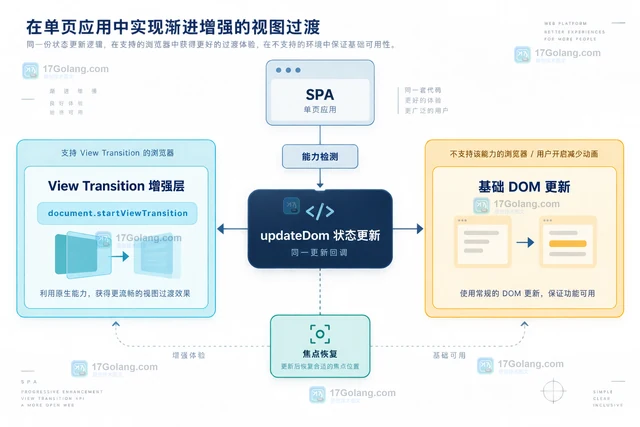
- View Transition API 在 SPA 状态切换中的降级方案
- 142浏览 收藏
-
- 文章 · 前端 | 4天前 | javascript · 表单 · FormData FormDataEvent formdata事件 原生表单
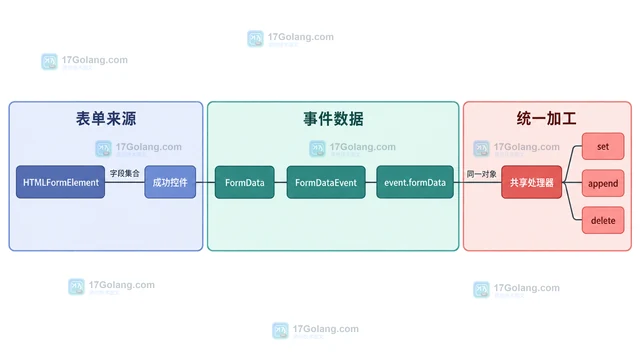
- FormDataEvent 统一拦截原生表单数据的实现
- 288浏览 收藏
-
- 文章 · 前端 | 4天前 | html · javascript · 表单 · requestSubmit form.submit HTML表单校验
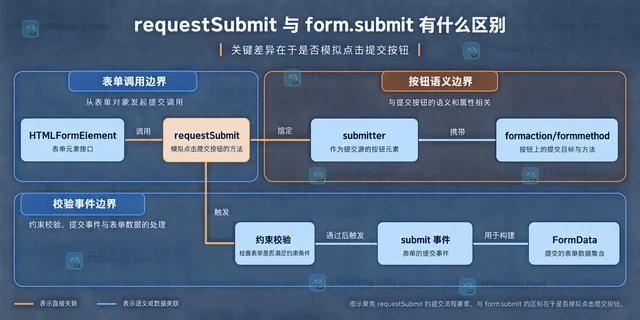
- requestSubmit 与 form.submit 有什么区别
- 392浏览 收藏
-
- 文章 · 前端 | 5天前 |
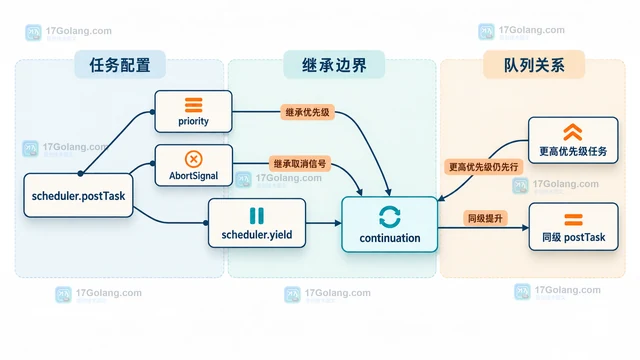
- scheduler.yield 怎么把长任务拆开又保持优先级
- 110浏览 收藏
-
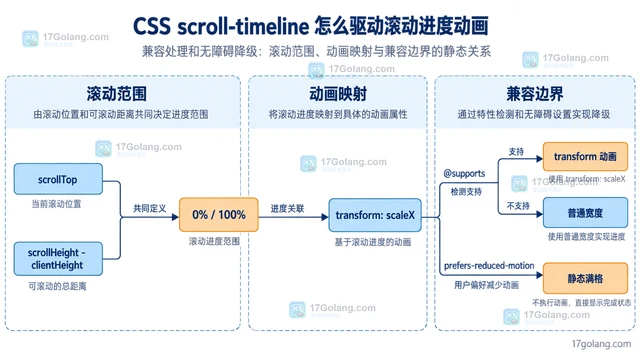
- 文章 · 前端 | 5天前 | CSS 滚动动画 animation-timeline scroll-timeline
- CSS scroll-timeline 怎么驱动滚动进度动画
- 251浏览 收藏
-
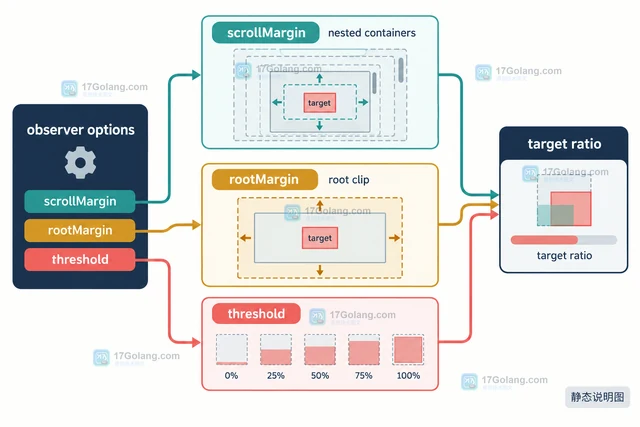
- 文章 · 前端 | 5天前 |
- IntersectionObserver scrollMargin 怎么处理嵌套滚动容器
- 380浏览 收藏
-

- 前端进阶之JavaScript设计模式
- 设计模式是开发人员在软件开发过程中面临一般问题时的解决方案,代表了最佳的实践。本课程的主打内容包括JS常见设计模式以及具体应用场景,打造一站式知识长龙服务,适合有JS基础的同学学习。
- 543次学习
-

- GO语言核心编程课程
- 本课程采用真实案例,全面具体可落地,从理论到实践,一步一步将GO核心编程技术、编程思想、底层实现融会贯通,使学习者贴近时代脉搏,做IT互联网时代的弄潮儿。
- 516次学习
-

- 简单聊聊mysql8与网络通信
- 如有问题加微信:Le-studyg;在课程中,我们将首先介绍MySQL8的新特性,包括性能优化、安全增强、新数据类型等,帮助学生快速熟悉MySQL8的最新功能。接着,我们将深入解析MySQL的网络通信机制,包括协议、连接管理、数据传输等,让
- 500次学习
-

- JavaScript正则表达式基础与实战
- 在任何一门编程语言中,正则表达式,都是一项重要的知识,它提供了高效的字符串匹配与捕获机制,可以极大的简化程序设计。
- 487次学习
-

- 从零制作响应式网站—Grid布局
- 本系列教程将展示从零制作一个假想的网络科技公司官网,分为导航,轮播,关于我们,成功案例,服务流程,团队介绍,数据部分,公司动态,底部信息等内容区块。网站整体采用CSSGrid布局,支持响应式,有流畅过渡和展现动画。
- 485次学习
-

- PubMedQA
- 深入了解PubMedQA生物医学问答数据集,涵盖其核心功能、使用方法及在临床决策、药物研发等场景的应用,助力提升NLP模型性能。
- 307次使用
-

- H2O EvalGPT
- H2O EvalGPT是H2O.ai推出的开源LLM评估平台,提供详细的大模型性能排行榜、行业特定基准测试及A/B测试功能,助您快速选择最适合项目的高性能大语言模型。
- 365次使用
-

- LMArena
- LMArena是加州大学伯克利分校推出的AI模型匿名评测平台。通过盲测投票机制,用户可对比不同大模型回答并生成实时排行榜,助力开发者优化模型及用户选择最佳AI工具。
- 360次使用
-

- HELM
- 深入了解斯坦福推出的HELM(Holistic Evaluation of Language Models)大模型评测体系。本文解析其核心功能、安装配置步骤及应用场景,涵盖准确性、公平性、鲁棒性等多维度指标,助力开发者全面优化语言模型性能。
- 329次使用
-

- MMBench
- MMBench是由上海人工智能实验室等机构联合推出的多模态基准测试平台,提供细粒度能力评估、大规模数据集及VLMEvalKit工具。本文详细介绍其核心功能、安装使用方法及应用场景,助力开发者全面评估多模态模型性能。
- 152次使用
-
- JavaScript函数定义及示例详解
- 2025-05-11 502浏览
-
- 智能体安全引领产业升级——国内AI安全产品市场深度分析
- 2026-08-21 501浏览
-
- CSS变量简化按钮悬停效果技巧
- 2026-05-31 501浏览
-
- JavaScript符号类型详解与应用
- 2026-05-31 501浏览
-
- HTML剪贴板复制粘贴怎么用
- 2026-05-26 501浏览


