go开源Hugo站点构建三步曲之集结渲染
在IT行业这个发展更新速度很快的行业,只有不停止的学习,才不会被行业所淘汰。如果你是Golang学习者,那么本文《go开源Hugo站点构建三步曲之集结渲染》就很适合你!本篇内容主要包括go开源Hugo站点构建三步曲之集结渲染,希望对大家的知识积累有所帮助,助力实战开发!
Assemble
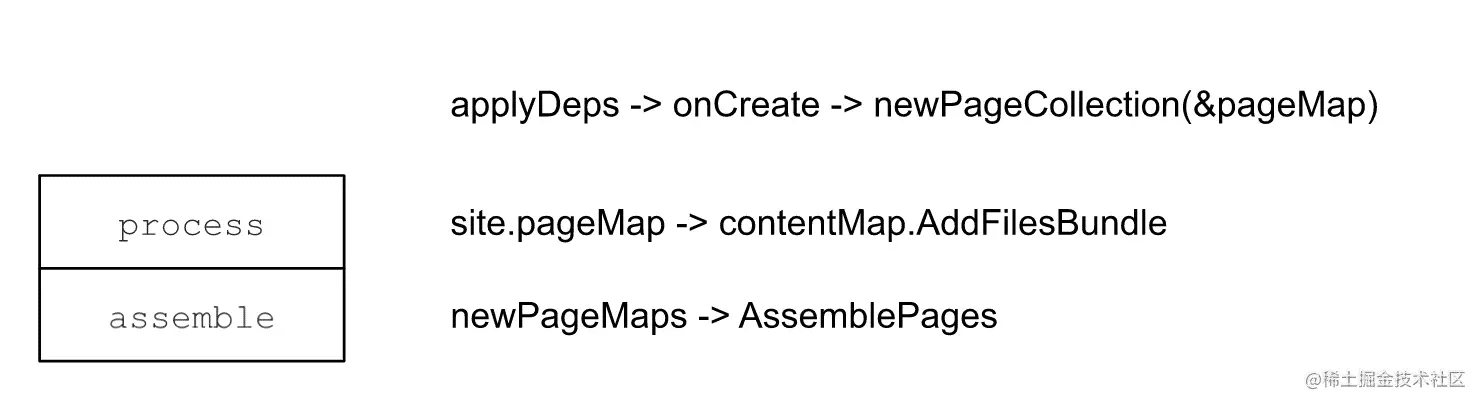
Assemble所做的事情很纯粹,那就是创建站点页面实例 - pageState。 因为支持多站点,contentMaps有多个。 所以Assemble不仅要创建pageState,还需要管理好所有的pages,这就用到了PageMaps。
type pageMap struct {
	s *Site
	*contentMap
}
type pageMaps struct {
	workers *para.Workers
	pmaps   []*pageMap
}
实际上pageMap就是由contentMap组合而来的。 而contentMap中的组成树的结点就是contentNode。
正好,每个contentNode又对应一个pageState。
type contentNode struct {
	p *pageState
	// Set if source is a file.
	// We will soon get other sources.
	fi hugofs.FileMetaInfo
	// The source path. Unix slashes. No leading slash.
	path string
	...
}
所以Assemble不仅要为前面Process处理过生成的contentNode创建pageState,还要补齐一些缺失的contentNode,如Section。
PageState
可以看出,Assemble的重点就是组建PageState,那她到底长啥样:
type pageState struct {
	// This slice will be of same length as the number of global slice of output
	// formats (for all sites).
	pageOutputs []*pageOutput
	// This will be shifted out when we start to render a new output format.
	*pageOutput
	// Common for all output formats.
	*pageCommon
	...
}
从注解中可以看出普通信息将由pageCommon提供,而输出信息则由pageOutput提供。 比较特殊的是pageOutputs,是pageOutput的数组。 在 基础架构中,对这一点有作分析。 这要归因于Hugo的多站点渲染策略 - 允许在不同的站点中重用其它站点的页面。
// hugo-playground/hugolib/page__new.go
// line 97
// Prepare output formats for all sites.
// We do this even if this page does not get rendered on
// its own. It may be referenced via .Site.GetPage and
// it will then need an output format.
ps.pageOutputs = make([]*pageOutput, len(ps.s.h.renderFormats))
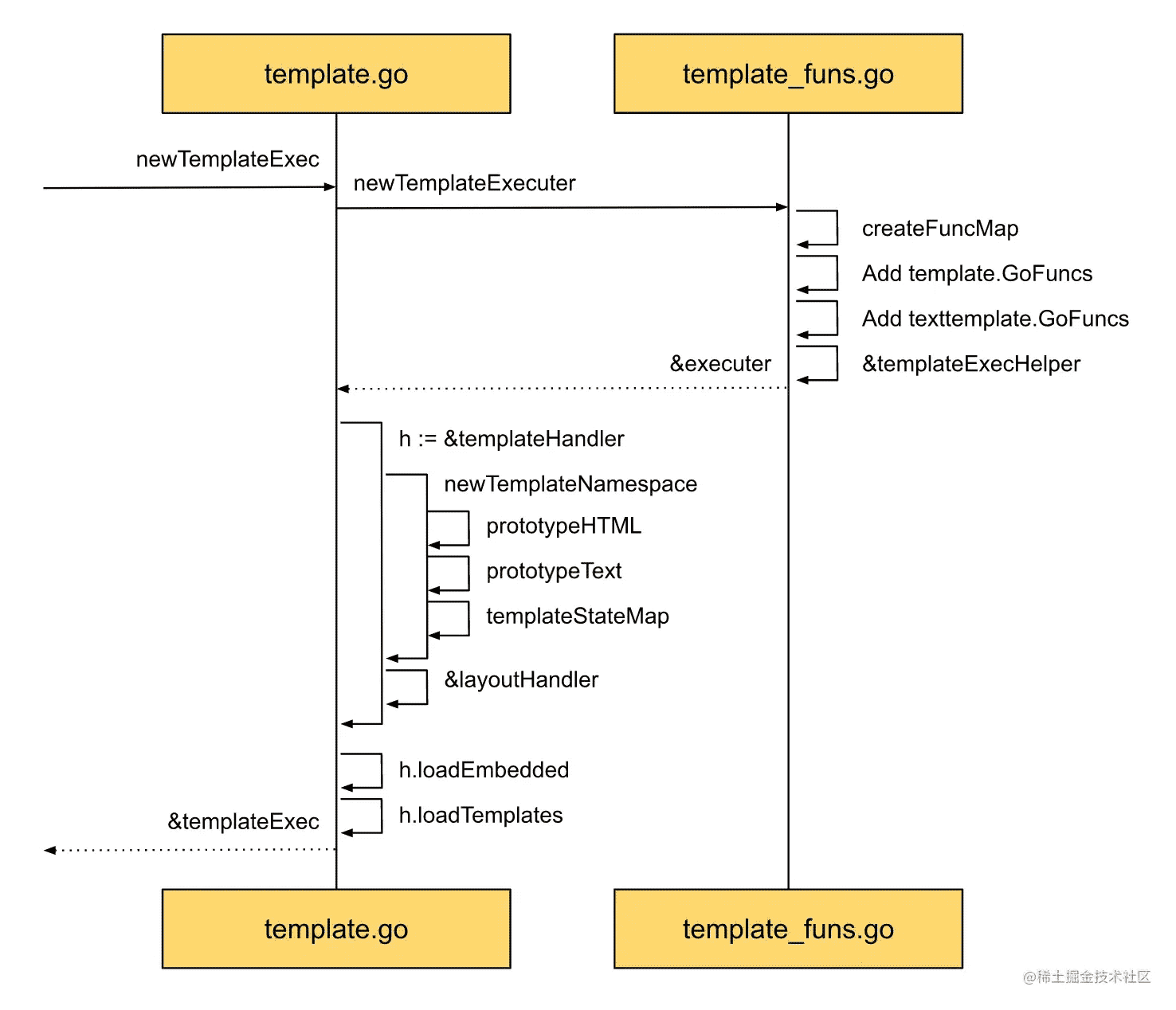
那在Assemble中Hugo是如何组织pageState实例的呢?
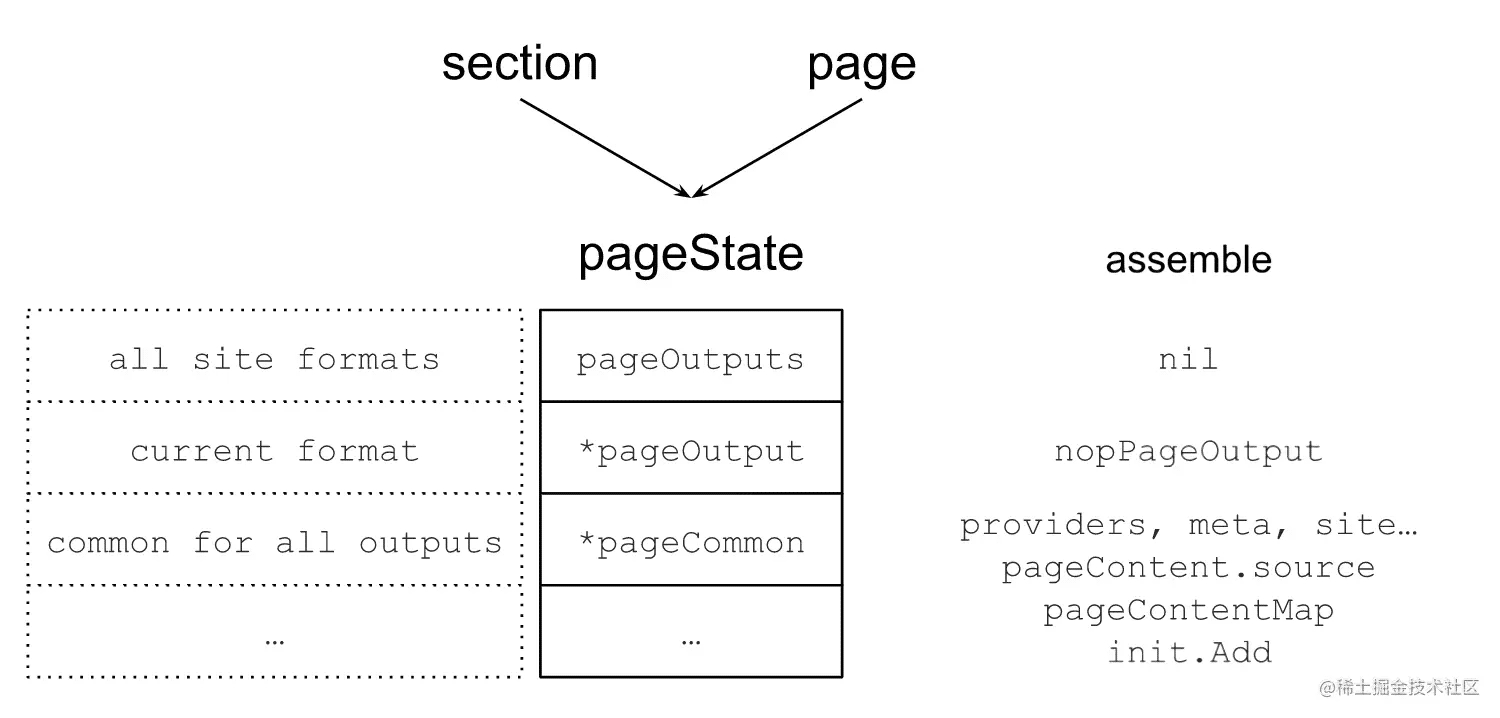
从上图中,可以看出Assemble阶段主要是新建pageState。 其中pageOutput在这一阶段只是一个占位符,空的nopPageOutput。 pageCommon则是在这一阶段给赋予了很多的信息,像meta相关的信息,及各种细节信息的providers。
动手实践 - Show Me the Code of Create a PageState
package main
import (
"fmt"
"html/template"
)
func main() {
outputFormats := createOutputFormats()
renderFormats := initRenderFormats(outputFormats)
s := &site{
outputFormats: outputFormats,
renderFormats: renderFormats,
}
ps := &pageState{
pageOutputs: nil,
pageOutput: nil,
pageCommon: &pageCommon{m: &pageMeta{kind: KindPage}},
}
ps.init(s)
// prepare
ps.pageOutput = ps.pageOutputs[0]
// render
fmt.Println(ps.targetPaths().TargetFilename)
fmt.Println(ps.Content())
fmt.Println(ps.m.kind)
}
type site struct {
outputFormats map[string]Formats
renderFormats Formats
}
type pageState struct {
// This slice will be of same length as the number of global slice of output
// formats (for all sites).
pageOutputs []*pageOutput
// This will be shifted out when we start to render a new output format.
*pageOutput
// Common for all output formats.
*pageCommon
}
func (p *pageState) init(s *site) {
pp := newPagePaths(s)
p.pageOutputs = make([]*pageOutput, len(s.renderFormats))
for i, f := range s.renderFormats {
ft, found := pp.targetPaths[f.Name]
if !found {
panic("target path not found")
}
providers := struct{ targetPather }{ft}
po := &pageOutput{
f: f,
pagePerOutputProviders: providers,
ContentProvider: nil,
}
contentProvider := newPageContentOutput(po)
po.ContentProvider = contentProvider
p.pageOutputs[i] = po
}
}
func newPageContentOutput(po *pageOutput) *pageContentOutput {
cp := &pageContentOutput{
f: po.f,
}
initContent := func() {
cp.content = template.HTML("hello content
")
}
cp.initMain = func() {
initContent()
}
return cp
}
func newPagePaths(s *site) pagePaths {
outputFormats := s.renderFormats
targets := make(map[string]targetPathsHolder)
for _, f := range outputFormats {
target := "/" + "blog" + "/" + f.BaseName +
"." + f.MediaType.SubType
paths := TargetPaths{
TargetFilename: target,
}
targets[f.Name] = targetPathsHolder{
paths: paths,
}
}
return pagePaths{
targetPaths: targets,
}
}
type pagePaths struct {
targetPaths map[string]targetPathsHolder
}
type targetPathsHolder struct {
paths TargetPaths
}
func (t targetPathsHolder) targetPaths() TargetPaths {
return t.paths
}
type pageOutput struct {
f Format
// These interface provides the functionality that is specific for this
// output format.
pagePerOutputProviders
ContentProvider
// May be nil.
cp *pageContentOutput
}
// pageContentOutput represents the Page content for a given output format.
type pageContentOutput struct {
f Format
initMain func()
content template.HTML
}
func (p *pageContentOutput) Content() any {
p.initMain()
return p.content
}
// these will be shifted out when rendering a given output format.
type pagePerOutputProviders interface {
targetPather
}
type targetPather interface {
targetPaths() TargetPaths
}
type TargetPaths struct {
// Where to store the file on disk relative to the publish dir. OS slashes.
TargetFilename string
}
type ContentProvider interface {
Content() any
}
type pageCommon struct {
m *pageMeta
}
type pageMeta struct {
// kind is the discriminator that identifies the different page types
// in the different page collections. This can, as an example, be used
// to to filter regular pages, find sections etc.
// Kind will, for the pages available to the templates, be one of:
// page, home, section, taxonomy and term.
// It is of string type to make it easy to reason about in
// the templates.
kind string
}
func initRenderFormats(
outputFormats map[string]Formats) Formats {
return outputFormats[KindPage]
}
func createOutputFormats() map[string]Formats {
m := map[string]Formats{
KindPage: {HTMLFormat},
}
return m
}
const (
KindPage = "page"
)
var HTMLType = newMediaType("text", "html")
// HTMLFormat An ordered list of built-in output formats.
var HTMLFormat = Format{
Name: "HTML",
MediaType: HTMLType,
BaseName: "index",
}
func newMediaType(main, sub string) Type {
t := Type{
MainType: main,
SubType: sub,
Delimiter: "."}
return t
}
type Type struct {
MainType string `json:"mainType"` // i.e. text
SubType string `json:"subType"` // i.e. html
Delimiter string `json:"delimiter"` // e.g. "."
}
type Format struct {
// The Name is used as an identifier. Internal output formats (i.e. HTML and RSS)
// can be overridden by providing a new definition for those types.
Name string `json:"name"`
MediaType Type `json:"-"`
// The base output file name used when not using "ugly URLs", defaults to "index".
BaseName string `json:"baseName"`
}
type Formats []Format
输出结果:
/blog/index.htmlhello content
page Program exited.
Render
基础信息是由pageCommon提供了,那渲染过程中的输出由谁提供呢?
没错,轮到pageOutput了:
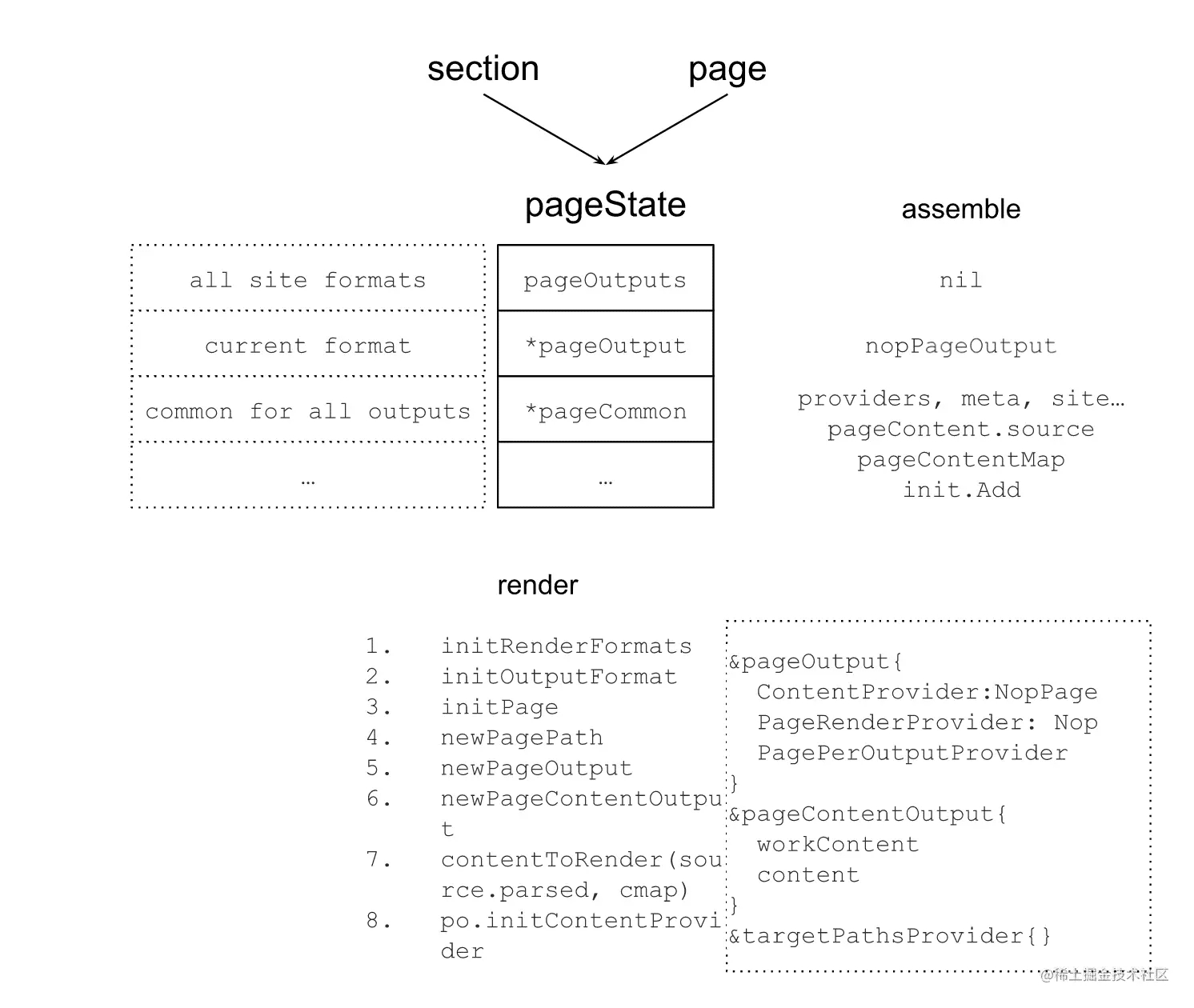
可以看到,在render阶段,pageState的pageOutput得到了最终的处理,为发布做准备了。 为了发布,最重的信息是发布什么,以及发布到哪里去。 这些信息都在pageOutput中,其中ContentProvider是提供发布内容的,而targetPathsProvider则是提供发布地址信息的。 其中地址信息主要来源于PagePath,这又和站点的RenderFormats和OutputFormats相关,哪下图所示:
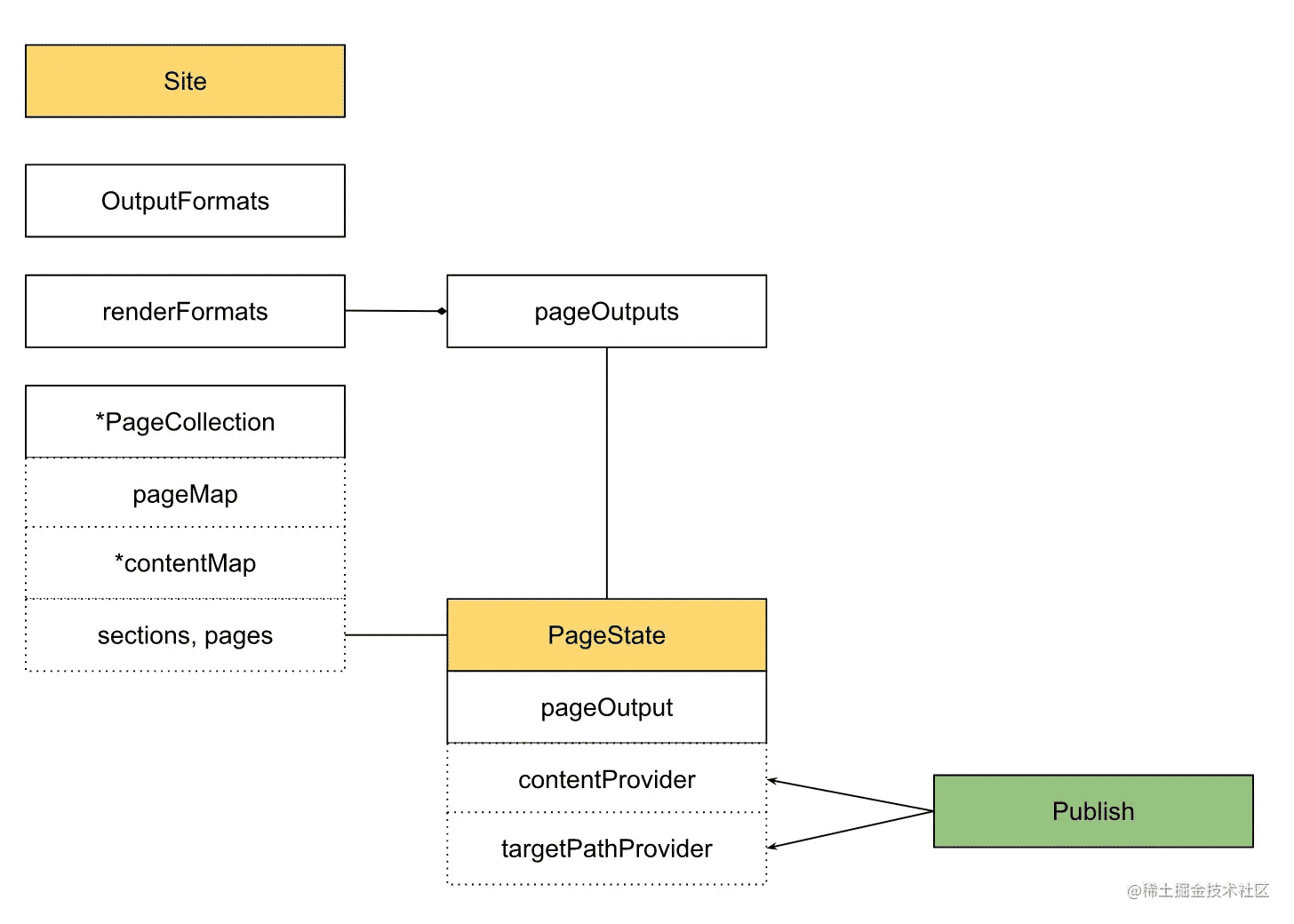
其中OutputFormats, RenderFormats及PageOutput之间的关系有在 基础架构中有详细提到,这里就不再赘述。
// We create a pageOutput for every output format combination, even if this
// particular page isn't configured to be rendered to that format.
type pageOutput struct {
	...
	// These interface provides the functionality that is specific for this
	// output format.
	pagePerOutputProviders
	page.ContentProvider
	page.TableOfContentsProvider
	page.PageRenderProvider
	// May be nil.
	cp *pageContentOutput
}
其中pageContentOutput正是实现了ContentProvider接口的实例。 其中有包含markdown文件原始信息的workContent字段,以及包含处理过后的内容content字段。 如Hugo Shortcode特性。 就是在这里经过contentToRender方法将原始信息进行处理,而最终实现的。
动手实践 - Show Me the Code of Publish
package main
import (
	"bytes"
	"fmt"
	"io"
	"os"
	"path/filepath"
)
// publisher needs to know:
// 1: what to publish
// 2: where to publish
func main() {
	// 1
	// src is template executed result
	// it is the source that we need to publish
	// take a look at template executor example
	// https://c.sunwei.xyz/template-executor.html
	src := &bytes.Buffer{}
	src.Write([]byte("template executed result"))
	b := &bytes.Buffer{}
	transformers := createTransformerChain()
	if err := transformers.Apply(b, src); err != nil {
		fmt.Println(err)
		return
	}
	dir, _ := os.MkdirTemp("", "hugo")
	defer os.RemoveAll(dir)
	// 2
	// targetPath is from pageState
	// this is where we need to publish
	// take a look at page state example
	// https://c.sunwei.xyz/page-state.html
	targetPath := filepath.Join(dir, "index.html")
	if err := os.WriteFile(
		targetPath,
		bytes.TrimSuffix(b.Bytes(), []byte("\n")),
		os.ModePerm); err != nil {
		panic(err)
	}
	fmt.Println("1. what to publish: ", string(b.Bytes()))
	fmt.Println("2. where to publish: ", dir)
}
func (c *Chain) Apply(to io.Writer, from io.Reader) error {
	fb := &bytes.Buffer{}
	if _, err := fb.ReadFrom(from); err != nil {
		return err
	}
	tb := &bytes.Buffer{}
	ftb := &fromToBuffer{from: fb, to: tb}
	for i, tr := range *c {
		if i > 0 {
			panic("switch from/to and reset to")
		}
		if err := tr(ftb); err != nil {
			continue
		}
	}
	_, err := ftb.to.WriteTo(to)
	return err
}
func createTransformerChain() Chain {
	transformers := NewEmpty()
	transformers = append(transformers, func(ft FromTo) error {
		content := ft.From().Bytes()
		w := ft.To()
		tc := bytes.Replace(
			content,
			[]byte("result"), []byte("transferred result"), 1)
		_, _ = w.Write(tc)
		return nil
	})
	return transformers
}
// Chain is an ordered processing chain. The next transform operation will
// receive the output from the previous.
type Chain []Transformer
// Transformer is the func that needs to be implemented by a transformation step.
type Transformer func(ft FromTo) error
// FromTo is sent to each transformation step in the chain.
type FromTo interface {
	From() BytesReader
	To() io.Writer
}
// BytesReader wraps the Bytes method, usually implemented by bytes.Buffer, and an
// io.Reader.
type BytesReader interface {
	// Bytes The slice given by Bytes is valid for use only until the next buffer modification.
	// That is, if you want to use this value outside of the current transformer step,
	// you need to take a copy.
	Bytes() []byte
	io.Reader
}
// NewEmpty creates a new slice of transformers with a capacity of 20.
func NewEmpty() Chain {
	return make(Chain, 0, 2)
}
// Implements contentTransformer
// Content is read from the from-buffer and rewritten to to the to-buffer.
type fromToBuffer struct {
	from *bytes.Buffer
	to   *bytes.Buffer
}
func (ft fromToBuffer) From() BytesReader {
	return ft.from
}
func (ft fromToBuffer) To() io.Writer {
	return ft.to
}
输出结果:
1. what to publish: template executed transferred result
2. where to publish: /tmp/hugo2834984546
Program exited.
终于介绍完啦!小伙伴们,这篇关于《go开源Hugo站点构建三步曲之集结渲染》的介绍应该让你收获多多了吧!欢迎大家收藏或分享给更多需要学习的朋友吧~golang学习网公众号也会发布Golang相关知识,快来关注吧!
 使用Golang快速构建出命令行应用程序
- 上一篇
- 使用Golang快速构建出命令行应用程序
- 下一篇
- go开源Hugo站点渲染之模板词法解析
-

- 丰富的大炮
- 受益颇多,一直没懂这个问题,但其实工作中常常有遇到...不过今天到这,看完之后很有帮助,总算是懂了,感谢师傅分享文章内容!
- 2023-04-30 03:54:09
-
- 朴实的小丸子
- 很详细,已收藏,感谢师傅的这篇技术文章,我会继续支持!
- 2023-04-25 19:28:03
-
- 踏实的长颈鹿
- 这篇博文太及时了,很详细,真优秀,收藏了,关注老哥了!希望老哥能多写Golang相关的文章。
- 2023-03-21 17:23:41
-
- 苗条的汽车
- 这篇文章真是及时雨啊,楼主加油!
- 2023-03-20 05:29:43
-
- Golang · Go教程 | 1天前 | goroutine · pprof · Go教程 · 运行时 · Go pprof 性能诊断 goroutine profile pprof.Lookup
- Go pprof.Lookup 怎样读取 goroutine profile 文本
- 465浏览 收藏
-
- Golang · Go教程 | 1天前 | 标准库 · HTTP · Go教程 · Go 请求头 textproto CanonicalMIMEHeaderKey MIMEHeader
- Go textproto.CanonicalMIMEHeaderKey 怎样统一请求头键名
- 283浏览 收藏
-
- Golang · Go教程 | 1天前 |
- Go image.NewRGBA 怎样创建可修改的 RGBA 画布
- 289浏览 收藏
-
- Golang · Go教程 | 1天前 |
- Go compress/gzip Reader 怎样复用并正确关闭
- 454浏览 收藏
-
- Golang · Go教程 | 1天前 |
- Go archive/zip FileHeader.ExternalAttrs 读取条目权限属性
- 460浏览 收藏
-
- Golang · Go教程 | 1天前 | 标准库 · Go教程 · Go 邮箱地址 net/mail ParseAddressList 收件人列表
- Go net/mail ParseAddressList 怎样解析多个收件人
- 465浏览 收藏
-
- Golang · Go教程 | 1天前 | Go教程 · Go crypto/rand 随机令牌 随机字节 密钥材料
- Go crypto/rand 怎样生成固定字节数随机值
- 443浏览 收藏
-
- Golang · Go教程 | 1天前 |
- Go net.Dialer 怎样配置连接建立超时
- 151浏览 收藏
-
- Golang · Go教程 | 1天前 |
- Go tls.Config 怎样限制最低 TLS 版本
- 197浏览 收藏
-
- Golang · Go教程 | 1天前 | go · Plugin · Go plugin 版本兼容 buildmode=plugin
- Go plugin 包为什么不适合跨版本加载
- 426浏览 收藏
-

- 前端进阶之JavaScript设计模式
- 设计模式是开发人员在软件开发过程中面临一般问题时的解决方案,代表了最佳的实践。本课程的主打内容包括JS常见设计模式以及具体应用场景,打造一站式知识长龙服务,适合有JS基础的同学学习。
- 543次学习
-

- GO语言核心编程课程
- 本课程采用真实案例,全面具体可落地,从理论到实践,一步一步将GO核心编程技术、编程思想、底层实现融会贯通,使学习者贴近时代脉搏,做IT互联网时代的弄潮儿。
- 516次学习
-

- 简单聊聊mysql8与网络通信
- 如有问题加微信:Le-studyg;在课程中,我们将首先介绍MySQL8的新特性,包括性能优化、安全增强、新数据类型等,帮助学生快速熟悉MySQL8的最新功能。接着,我们将深入解析MySQL的网络通信机制,包括协议、连接管理、数据传输等,让
- 500次学习
-

- JavaScript正则表达式基础与实战
- 在任何一门编程语言中,正则表达式,都是一项重要的知识,它提供了高效的字符串匹配与捕获机制,可以极大的简化程序设计。
- 487次学习
-

- 从零制作响应式网站—Grid布局
- 本系列教程将展示从零制作一个假想的网络科技公司官网,分为导航,轮播,关于我们,成功案例,服务流程,团队介绍,数据部分,公司动态,底部信息等内容区块。网站整体采用CSSGrid布局,支持响应式,有流畅过渡和展现动画。
- 485次学习
-
- PubMedQA
- 深入了解PubMedQA生物医学问答数据集,涵盖其核心功能、使用方法及在临床决策、药物研发等场景的应用,助力提升NLP模型性能。
- 637次使用
-
- H2O EvalGPT
- H2O EvalGPT是H2O.ai推出的开源LLM评估平台,提供详细的大模型性能排行榜、行业特定基准测试及A/B测试功能,助您快速选择最适合项目的高性能大语言模型。
- 670次使用
-

- LMArena
- LMArena是加州大学伯克利分校推出的AI模型匿名评测平台。通过盲测投票机制,用户可对比不同大模型回答并生成实时排行榜,助力开发者优化模型及用户选择最佳AI工具。
- 713次使用
-
- HELM
- 深入了解斯坦福推出的HELM(Holistic Evaluation of Language Models)大模型评测体系。本文解析其核心功能、安装配置步骤及应用场景,涵盖准确性、公平性、鲁棒性等多维度指标,助力开发者全面优化语言模型性能。
- 673次使用
-

- MMBench
- MMBench是由上海人工智能实验室等机构联合推出的多模态基准测试平台,提供细粒度能力评估、大规模数据集及VLMEvalKit工具。本文详细介绍其核心功能、安装使用方法及应用场景,助力开发者全面评估多模态模型性能。
- 508次使用
-
- Java 性能优化上线清单:从定位、改造到灰度发布
- 2026-06-11 860浏览
-
- Spring Boot 压测验证:Gatling、JMeter 与性能回归门禁
- 2026-06-11 843浏览
-
- Java NMT 非堆内存排查:Direct Buffer、线程栈与 Metaspace 分析
- 2026-06-11 826浏览
-
- Spring Boot 容器内存优化:JVM 堆、非堆与 MaxRAMPercentage
- 2026-06-11 809浏览
-
- Tomcat 连接与线程参数调优:maxThreads、acceptCount 与 KeepAlive
- 2026-06-11 792浏览