
一次 group by + order by 性能优化分析
数据库小白一枚,正在不断学习积累知识,现将学习到的知识记录一下,也是将我的所得分享给大家!而今天这篇文章《一次 group by + order by 性能优化分析》带大家来了解一下一次 group by + order by 性能优化分析,希望对大家的知识积累有所帮助,从而弥补自己的不足,助力实战开发!
原文:我的个人博客 https://mengkang.net/1302.html
工作了两三年,技术停滞不前,迷茫没有方向,不如看下我的直播 PHP 进阶之路 (金三银四跳槽必考,一般人我不告诉他)
最近通过一个日志表做排行的时候发现特别卡,最后问题得到了解决,梳理一些索引和MySQL执行过程的经验,但是最后还是有5个谜题没解开,希望大家帮忙解答下
主要包含如下知识点
- 用数据说话证明慢日志的扫描行数到底是如何统计出来的
- 从 group by 执行原理找出优化方案
- 排序的实现细节
- gdb 源码调试
背景
需要分别统计本月、本周被访问的文章的 TOP10。日志表如下
CREATE TABLE `article_rank` (
  `id` int(11) unsigned NOT NULL AUTO_INCREMENT,
  `aid` int(11) unsigned NOT NULL,
  `pv` int(11) unsigned NOT NULL DEFAULT '1',
  `day` int(11) NOT NULL COMMENT '日期 例如 20171016',
  PRIMARY KEY (`id`),
  KEY `idx_day_aid_pv` (`day`,`aid`,`pv`),
  KEY `idx_aid_day_pv` (`aid`,`day`,`pv`)
) ENGINE=InnoDB DEFAULT CHARSET=utf8
准备工作
为了能够清晰的验证自己的一些猜想,在虚拟机里安装了一个 debug 版的 mysql,然后开启了慢日志收集,用于统计扫描行数
安装
- 下载源码
- 编译安装
- 创建 mysql 用户
- 初始化数据库
- 初始化 mysql 配置文件
- 修改密码
如果你兴趣,具体可以参考我的博客,一步步安装 https://mengkang.net/1335.html
开启慢日志
编辑配置文件,在
slow_query_log=1
slow_query_log_file=xxx
long_query_time=0
log_queries_not_using_indexes=1
性能分析
发现问题
假如我需要查询
mysql> explain select aid,sum(pv) as num from article_rank where day>=20181220 and day
系统默认会走的索引是
# Time: 2019-03-17T03:02:27.984091Z
# User@Host: root[root] @ localhost []  Id:     6
# Query_time: 56.959484  Lock_time: 0.000195 Rows_sent: 10  Rows_examined: 1337315
SET timestamp=1552791747;
select aid,sum(pv) as num from article_rank where day>=20181220 and day
为什么扫描行数是 1337315
我们查询两个数据,一个是满足条件的行数,一个是
mysql> select count(*) from article_rank where day>=20181220 and day select count(distinct aid) from article_rank where day>=20181220 and day
发现
# 开启 optimizer_trace
set optimizer_trace='enabled=on';
# 执行 sql
select aid,sum(pv) as num from article_rank where day>=20181220 and day
摘取里面最后的执行结果如下
{
  "join_execution": {
    "select#": 1,
    "steps": [
      {
        "creating_tmp_table": {
          "tmp_table_info": {
            "table": "intermediate_tmp_table",
            "row_length": 20,
            "key_length": 4,
            "unique_constraint": false,
            "location": "memory (heap)",
            "row_limit_estimate": 838860
          }
        }
      },
      {
        "converting_tmp_table_to_ondisk": {
          "cause": "memory_table_size_exceeded",
          "tmp_table_info": {
            "table": "intermediate_tmp_table",
            "row_length": 20,
            "key_length": 4,
            "unique_constraint": false,
            "location": "disk (InnoDB)",
            "record_format": "fixed"
          }
        }
      },
      {
        "filesort_information": [
          {
            "direction": "desc",
            "table": "intermediate_tmp_table",
            "field": "num"
          }
        ],
        "filesort_priority_queue_optimization": {
          "limit": 10,
          "rows_estimate": 1057,
          "row_size": 36,
          "memory_available": 262144,
          "chosen": true
        },
        "filesort_execution": [
        ],
        "filesort_summary": {
          "rows": 11,
          "examined_rows": 552203,
          "number_of_tmp_files": 0,
          "sort_buffer_size": 488,
          "sort_mode": ""
        }
      }
    ]
  }
}
分析临时表字段
mysql gdb 调试更多细节 https://mengkang.net/1336.html
通过
Breakpoint 1, trace_tmp_table (trace=0x7eff94003088, table=0x7eff94937200) at /root/newdb/mysql-server/sql/sql_tmp_table.cc:2306
warning: Source file is more recent than executable.
2306      trace_tmp.add("row_length",table->s->reclength).
(gdb) p table->s->reclength
$1 = 20
(gdb) p table->s->fields
$2 = 2
(gdb) p (*(table->field+0))->field_name
$3 = 0x7eff94010b0c "aid"
(gdb) p (*(table->field+1))->field_name
$4 = 0x7eff94007518 "num"
(gdb) p (*(table->field+0))->row_pack_length()
$5 = 4
(gdb) p (*(table->field+1))->row_pack_length()
$6 = 15
(gdb) p (*(table->field+0))->type()
$7 = MYSQL_TYPE_LONG
(gdb) p (*(table->field+1))->type()
$8 = MYSQL_TYPE_NEWDECIMAL
(gdb)
通过上面的打印,确认了字段类型,一个
# Query_time: 4.406927  Lock_time: 0.000200 Rows_sent: 10  Rows_examined: 1337315
SET timestamp=1552791804;
select aid,sum(pv) as num from article_rank force index(idx_aid_day_pv) where day>=20181220 and day
扫描行数都是
mysql> explain select aid,sum(pv) as num from article_rank force index(idx_day_aid_pv) where day>=20181220 and day
注意我上面使用了
mysql> explain select aid,sum(pv) as num from article_rank force index(idx_aid_day_pv) where day>=20181220 and day
查看 optimizer trace 信息
# 开启optimizer_trace
set optimizer_trace='enabled=on';
# 执行 sql
select aid,sum(pv) as num from article_rank force index(idx_aid_day_pv) where day>=20181220 and day
摘取里面最后的执行结果如下
{
  "join_execution": {
    "select#": 1,
    "steps": [
      {
        "creating_tmp_table": {
          "tmp_table_info": {
            "table": "intermediate_tmp_table",
            "row_length": 20,
            "key_length": 0,
            "unique_constraint": false,
            "location": "memory (heap)",
            "row_limit_estimate": 838860
          }
        }
      },
      {
        "filesort_information": [
          {
            "direction": "desc",
            "table": "intermediate_tmp_table",
            "field": "num"
          }
        ],
        "filesort_priority_queue_optimization": {
          "limit": 10,
          "rows_estimate": 552213,
          "row_size": 24,
          "memory_available": 262144,
          "chosen": true
        },
        "filesort_execution": [
        ],
        "filesort_summary": {
          "rows": 11,
          "examined_rows": 552203,
          "number_of_tmp_files": 0,
          "sort_buffer_size": 352,
          "sort_mode": ""
        }
      }
    ]
  }
}
执行流程如下
- 创建一张临时表,临时表上有两个字段,
drop procedure if exists idata;
delimiter ;;
create procedure idata()
begin
  declare i int;
  declare aid int;
  declare pv int;
  declare post_day int;
  set i=1;
  while(i
# Query_time: 9.151270  Lock_time: 0.000508 Rows_sent: 10  Rows_examined: 2122417
SET timestamp=1552889936;
select aid,sum(pv) as num from article_rank force index(idx_aid_day_pv) where day>=20181220 and day
这里扫描行数
mysql> show global variables like '%table_size';
+---------------------+----------+
| Variable_name       | Value    |
+---------------------+----------+
| max_heap_table_size | 16777216 |
| tmp_table_size      | 16777216 |
+---------------------+----------+
https://dev.mysql.com/doc/ref...
https://dev.mysql.com/doc/ref...max_heap_table_size
This variable sets the maximum size to which user-created MEMORY tables are permitted to grow. The value of the variable is used to calculate MEMORY table MAX_ROWS values. Setting this variable has no effect on any existing MEMORY table, unless the table is re-created with a statement such as CREATE TABLE or altered with ALTER TABLE or TRUNCATE TABLE. A server restart also sets the maximum size of existing MEMORY tables to the global max_heap_table_size value.tmp_table_size
The maximum size of internal in-memory temporary tables. This variable does not apply to user-created MEMORY tables.
The actual limit is determined from whichever of the values of tmp_table_size and max_heap_table_size is smaller. If an in-memory temporary table exceeds the limit, MySQL automatically converts it to an on-disk temporary table. The internal_tmp_disk_storage_engine option defines the storage engine used for on-disk temporary tables.也就是说这里临时表的限制是
set tmp_table_size=33554432;
set max_heap_table_size=33554432;
# Query_time: 5.910553  Lock_time: 0.000210 Rows_sent: 10  Rows_examined: 1337315
SET timestamp=1552803869;
select aid,sum(pv) as num from article_rank where day>=20181220 and day
方案3 使用 SQL_BIG_RESULT 优化
告诉优化器,查询结果比较多,临时表直接走磁盘存储。
# Query_time: 6.144315  Lock_time: 0.000183 Rows_sent: 10  Rows_examined: 2122417
SET timestamp=1552802804;
select SQL_BIG_RESULT aid,sum(pv) as num from article_rank where day>=20181220 and day
扫描行数是
# SQL1
select aid,sum(pv) as num from article_rank where day>=20181220 and day=20181220 and day
- SQL1 执行过程中,使用的是全字段排序最后不需要回表为什么总扫描行数还要加上10才对得上?
- SQL1 与 SQL2
group by
之后得到的行数都是552203
,为什么会出现 SQL1 内存不够,里面还有哪些细节呢? - trace 信息里的
creating_tmp_table.tmp_table_info.row_limit_estimate
都是838860
;计算由来是临时表的内存限制大小16MB
,而一行需要占的空间是20字节,那么最多只能容纳floor(16777216/20) = 838860
行,而实际我们需要放入临时表的行数是785102
。为什么呢? - SQL1 使用
SQL_BIG_RESULT
优化之后,原始表需要扫描的行数会乘以2,背后逻辑是什么呢?为什么仅仅是不再尝试往内存临时表里写入这一步会相差10多倍的性能? - 通过源码看到 trace 信息里面很多扫描行数都不是实际的行数,既然是实际执行,为什么 trace 信息里不输出真实的扫描行数和容量等呢,比如
filesort_priority_queue_optimization.rows_estimate
在SQL1中的扫描行数我通过gdb看到计算规则如附录图 1 - 有没有工具能够统计 SQL 执行过程中的 I/O 次数?
附录
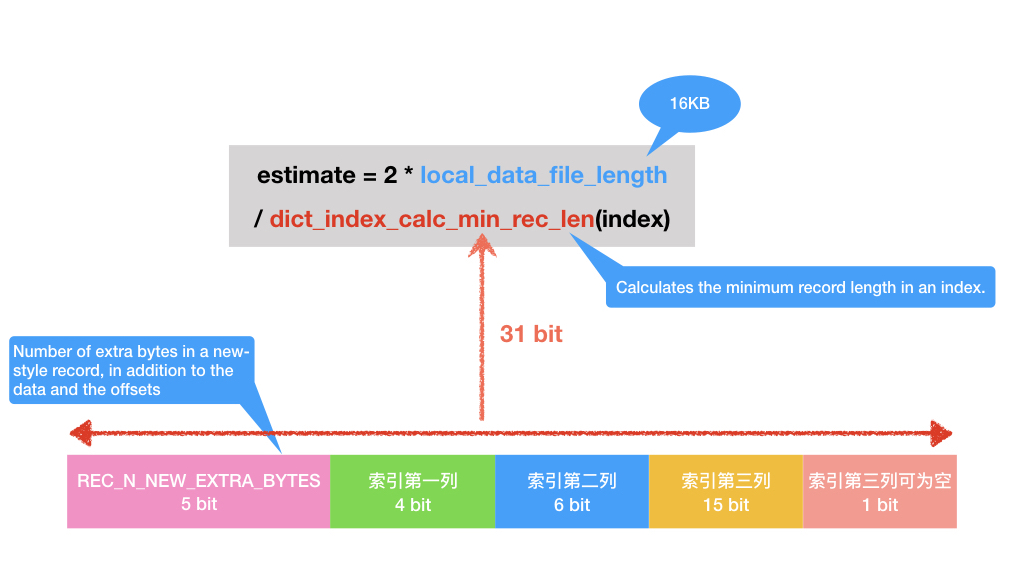
好了,本文到此结束,带大家了解了《一次 group by + order by 性能优化分析》,希望本文对你有所帮助!关注golang学习网公众号,给大家分享更多数据库知识!
 leetcode SQL题目解析
- 上一篇
- leetcode SQL题目解析

- 下一篇
- mysql 2005报错
-
- 数据库 · MySQL | 2小时前 | MySQL · 执行计划 · 性能排查 · explain 执行计划 统计信息 ANALYZE TABLE MySQL Histogram
- MySQL Histogram 统计信息过期会怎样影响执行计划
- 145浏览 收藏
-
- 数据库 · MySQL | 4小时前 | MySQL · 索引优化 · mysql explain 不可见索引 索引回归 Performance Schema
- MySQL 不可见索引适合怎样做上线前回归验证
- 422浏览 收藏
-

- 数据库 · MySQL | 5小时前 |
- Optimizer Trace 适合解决哪些执行计划疑问
- 480浏览 收藏
-
- 数据库 · MySQL | 10小时前 | MySQL · InnoDB · 批量插入 MySQL 批量写入 InnoDB事务 事务大小 回滚成本
- 批量写入如何兼顾吞吐与回滚成本:事务大小实测方法
- 160浏览 收藏
-

- 数据库 · MySQL | 16小时前 |
- GTID 复制切换前要检查什么:一致性与故障回退清单
- 153浏览 收藏
-
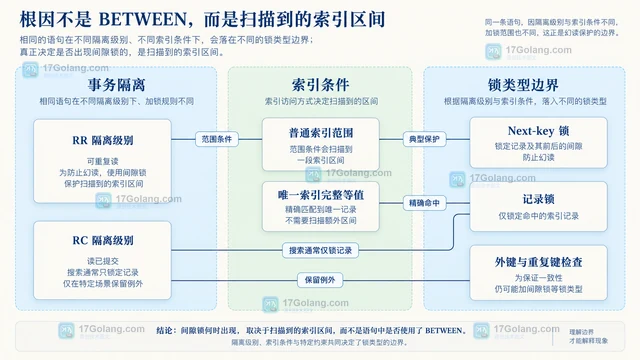
- 数据库 · MySQL | 1天前 |
- 间隙锁何时出现:用范围更新解释幻读保护边界
- 313浏览 收藏
-
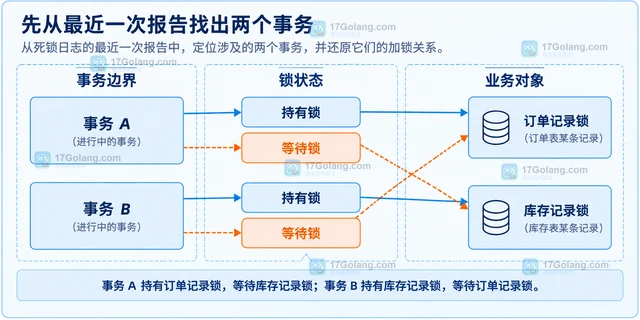
- 数据库 · MySQL | 1天前 |
- 死锁日志怎么看:还原事务交叉加锁的最短路径
- 351浏览 收藏
-
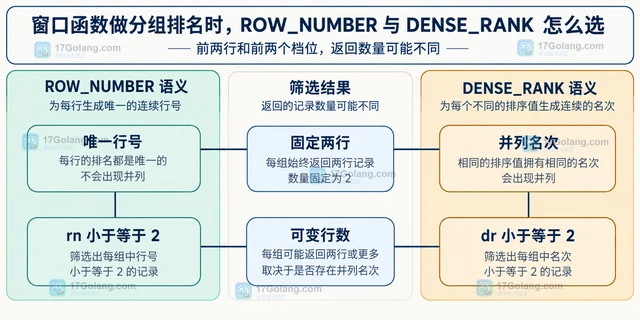
- 数据库 · MySQL | 1天前 | MySQL教程 · ROW_NUMBER MySQL窗口函数 DENSE_RANK 分组排名 每组TopN
- 窗口函数做分组排名时,ROW_NUMBER 与 DENSE_RANK 怎么选
- 112浏览 收藏


-

- 前端进阶之JavaScript设计模式
- 设计模式是开发人员在软件开发过程中面临一般问题时的解决方案,代表了最佳的实践。本课程的主打内容包括JS常见设计模式以及具体应用场景,打造一站式知识长龙服务,适合有JS基础的同学学习。
- 543次学习
-

- GO语言核心编程课程
- 本课程采用真实案例,全面具体可落地,从理论到实践,一步一步将GO核心编程技术、编程思想、底层实现融会贯通,使学习者贴近时代脉搏,做IT互联网时代的弄潮儿。
- 516次学习
-

- 简单聊聊mysql8与网络通信
- 如有问题加微信:Le-studyg;在课程中,我们将首先介绍MySQL8的新特性,包括性能优化、安全增强、新数据类型等,帮助学生快速熟悉MySQL8的最新功能。接着,我们将深入解析MySQL的网络通信机制,包括协议、连接管理、数据传输等,让
- 500次学习
-

- JavaScript正则表达式基础与实战
- 在任何一门编程语言中,正则表达式,都是一项重要的知识,它提供了高效的字符串匹配与捕获机制,可以极大的简化程序设计。
- 487次学习
-

- 从零制作响应式网站—Grid布局
- 本系列教程将展示从零制作一个假想的网络科技公司官网,分为导航,轮播,关于我们,成功案例,服务流程,团队介绍,数据部分,公司动态,底部信息等内容区块。网站整体采用CSSGrid布局,支持响应式,有流畅过渡和展现动画。
- 485次学习
-

- PubMedQA
- 深入了解PubMedQA生物医学问答数据集,涵盖其核心功能、使用方法及在临床决策、药物研发等场景的应用,助力提升NLP模型性能。
- 384次使用
-

- H2O EvalGPT
- H2O EvalGPT是H2O.ai推出的开源LLM评估平台,提供详细的大模型性能排行榜、行业特定基准测试及A/B测试功能,助您快速选择最适合项目的高性能大语言模型。
- 455次使用
-

- LMArena
- LMArena是加州大学伯克利分校推出的AI模型匿名评测平台。通过盲测投票机制,用户可对比不同大模型回答并生成实时排行榜,助力开发者优化模型及用户选择最佳AI工具。
- 470次使用
-

- HELM
- 深入了解斯坦福推出的HELM(Holistic Evaluation of Language Models)大模型评测体系。本文解析其核心功能、安装配置步骤及应用场景,涵盖准确性、公平性、鲁棒性等多维度指标,助力开发者全面优化语言模型性能。
- 409次使用
-

- MMBench
- MMBench是由上海人工智能实验室等机构联合推出的多模态基准测试平台,提供细粒度能力评估、大规模数据集及VLMEvalKit工具。本文详细介绍其核心功能、安装使用方法及应用场景,助力开发者全面评估多模态模型性能。
- 237次使用
-
- MySQL 明明加了索引,为什么查询还是很慢?先查这 6 个点
- 2026-06-27 374浏览
-
- golang MySQL实现对数据库表存储获取操作示例
- 2022-12-22 499浏览
-
- golang 基于 mysql 简单实现分布式读写锁
- 2023-01-07 384浏览
-
- 详解如何利用GORM实现MySQL事务
- 2023-01-07 184浏览
-
- Go语言实现操作MySQL的基础知识总结
- 2023-01-23 265浏览


