
文章不知道大家是否熟悉?今天我将给大家介绍《将待办事项列表设置为Windows壁纸(由SONNET编码)》,这篇文章主要会讲到等等知识点,如果你在看完本篇文章后,有更好的建议或者发现哪里有问题,希望大家都能积极评论指出,谢谢!希望我们能一起加油进步!
amoy-todo-wallpaper
>将待办事项列表设置为windows壁纸。
这是一个由claude-sonnet-3.5编码的python程序,并进行了较小的修订。
github:https://github.com/casualwriter/amoy-todo-wallpaper
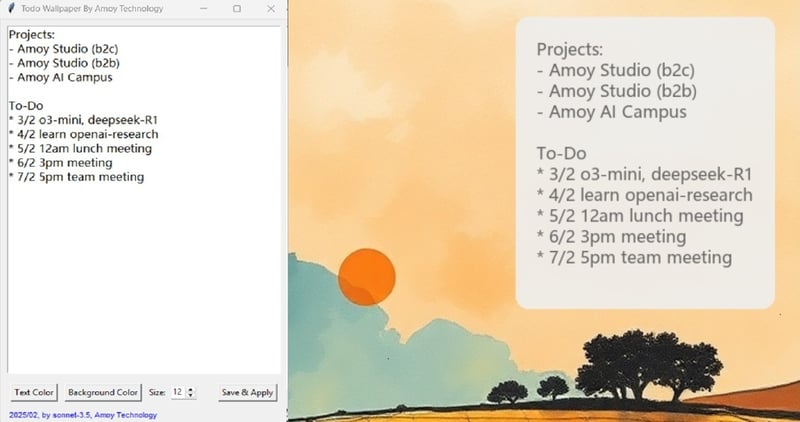
如何使用
- >下载amoy-todo-wallpaper.zip
- >解压缩所有文件
- >运行amoy-todo.exe
此程序将打开todo.txt文件进行编辑,单击[保存并应用]将其设置为windows wallpaper。
文件
- 源代码amoy-todo.py
- 背景图像背景.png(flux-schnell)
- >下载zip amoy-todo-wallpaper.zip
迅速的
write a python program to set a text file as wallpaper, add UI to edit todo.txt, and allow setup font-color and content background color.

- text file is "todo.txt", left-align, grey text color
- round content area 12px
- allow set font size setting, default 16px
- background image is "background.png"
- nice look fonts, support chinese
- show in top-right with margin 120px, light grey background #eee
- do not filter empty line
- output python code in code-block
笔记
- 2025/02/03,v1,在十四行诗-3.5,deepseek-r1和o3-mini上测试,最终选择十四行诗版本,因为代码最简单。
- 2025/02/03,v2,添加字体尺寸设置。 >
- 享受它。
本篇关于《将待办事项列表设置为Windows壁纸(由SONNET编码)》的介绍就到此结束啦,但是学无止境,想要了解学习更多关于文章的相关知识,请关注golang学习网公众号!
本文内容来源于互联网,如有侵权请联系删除。