
Documenso 和 aws-smage-upload 示例之间的 Spload 功能比较
今日不肯埋头,明日何以抬头!每日一句努力自己的话哈哈~哈喽,今天我将给大家带来一篇《Documenso 和 aws-smage-upload 示例之间的 Spload 功能比较》,主要内容是讲解等等,感兴趣的朋友可以收藏或者有更好的建议在评论提出,我都会认真看的!大家一起进步,一起学习!
在本文中,我们将比较 documenso 和 aws s3 图像上传示例之间将文件上传到 aws s3 所涉及的步骤。
我们从 vercel 提供的简单示例开始。
示例/aws-s3-image-upload
vercel 提供了一个将文件上传到 aws s3 的良好示例。
此示例的自述文件提供了两个选项,您可以使用现有的 s3 存储桶或创建新存储桶。了解这一点有帮助
您正确配置了上传功能。
又到了我们看源码的时间了。我们正在寻找 type=file 的输入元素。在 app/page.tsx 中,您将找到以下代码:
return (
upload a file to s3
)
}
onchange
onchange 使用 setfile 更新状态,但不执行上传。当您提交此表单时就会进行上传。
onchange={(e) => {
  const files = e.target.files
  if (files) {
    setfile(files[0])
  }
}}
处理提交
handlesubmit 函数中发生了很多事情。我们需要分析这个handlesubmit函数中的操作列表。我已在此代码片段中编写了注释来解释这些步骤。
const handlesubmit = async (e: react.formevent) => {
    e.preventdefault()

    if (!file) {
      alert('please select a file to upload.')
      return
    }

    setuploading(true)

    const response = await fetch(
      process.env.next_public_base_url + '/api/upload',
      {
        method: 'post',
        headers: {
          'content-type': 'application/json',
        },
        body: json.stringify({ filename: file.name, contenttype: file.type }),
      }
    )

    if (response.ok) {
      const { url, fields } = await response.json()

      const formdata = new formdata()
      object.entries(fields).foreach(([key, value]) => {
        formdata.append(key, value as string)
      })
      formdata.append('file', file)

      const uploadresponse = await fetch(url, {
        method: 'post',
        body: formdata,
      })

      if (uploadresponse.ok) {
        alert('upload successful!')
      } else {
        console.error('s3 upload error:', uploadresponse)
        alert('upload failed.')
      }
    } else {
      alert('failed to get pre-signed url.')
    }

    setuploading(false)
  }
api/上传
api/upload/route.ts 有以下代码:
import { createpresignedpost } from '@aws-sdk/s3-presigned-post'
import { s3client } from '@aws-sdk/client-s3'
import { v4 as uuidv4 } from 'uuid'

export async function post(request: request) {
  const { filename, contenttype } = await request.json()

  try {
    const client = new s3client({ region: process.env.aws_region })
    const { url, fields } = await createpresignedpost(client, {
      bucket: process.env.aws_bucket_name,
      key: uuidv4(),
      conditions: [
        ['content-length-range', 0, 10485760], // up to 10 mb
        ['starts-with', '$content-type', contenttype],
      ],
      fields: {
        acl: 'public-read',
        'content-type': contenttype,
      },
      expires: 600, // seconds before the presigned post expires. 3600 by default.
    })

    return response.json({ url, fields })
  } catch (error) {
    return response.json({ error: error.message })
  }
}
handlesubmit 中的第一个请求是 /api/upload 并发送内容类型和文件名作为负载。解析如下:
const { filename, contenttype } = await request.json()
下一步是创建一个 s3 客户端,然后创建一个返回 url 和字段的预签名帖子。您将使用此网址上传您的文件。
有了这些知识,我们来分析一下documenso中的上传工作原理并进行一些比较。
在 documenso 中上传 pdf 文件
让我们从 type=file 的输入元素开始。 documenso 中的代码组织方式不同。您会在名为 document-dropzone.tsx.
的文件中找到输入元素
{_(heading[type])}
这里getinputprops返回的是usedropzone。 documenso 使用react-dropzone。
import { usedropzone } from 'react-dropzone';
ondrop 调用 props.ondrop,你会在 upload-document.tsx 中找到一个名为 onfiledrop 的属性值。
让我们看看 onfiledrop 函数会发生什么。
const onfiledrop = async (file: file) => {
    try {
      setisloading(true);

      const { type, data } = await putpdffile(file);

      const { id: documentdataid } = await createdocumentdata({
        type,
        data,
      });

      const { id } = await createdocument({
        title: file.name,
        documentdataid,
        teamid: team?.id,
      });

      void refreshlimits();

      toast({
        title: _(msg`document uploaded`),
        description: _(msg`your document has been uploaded successfully.`),
        duration: 5000,
      });

      analytics.capture('app: document uploaded', {
        userid: session?.user.id,
        documentid: id,
        timestamp: new date().toisostring(),
      });

      router.push(`${formatdocumentspath(team?.url)}/${id}/edit`);
    } catch (err) {
      const error = apperror.parseerror(err);

      console.error(err);

      if (error.code === 'invalid_document_file') {
        toast({
          title: _(msg`invalid file`),
          description: _(msg`you cannot upload encrypted pdfs`),
          variant: 'destructive',
        });
      } else if (err instanceof trpcclienterror) {
        toast({
          title: _(msg`error`),
          description: err.message,
          variant: 'destructive',
        });
      } else {
        toast({
          title: _(msg`error`),
          description: _(msg`an error occurred while uploading your document.`),
          variant: 'destructive',
        });
      }
    } finally {
      setisloading(false);
    }
  };
发生了很多事情,但为了我们的分析,我们只考虑名为 putfile 的函数。
putpdf文件
putpdffile 定义在 upload/put-file.ts
/**
 * uploads a document file to the appropriate storage location and creates
 * a document data record.
 */
export const putpdffile = async (file: file) => {
  const isencrypteddocumentsallowed = await getflag('app_allow_encrypted_documents').catch(
    () => false,
  );

  const pdf = await pdfdocument.load(await file.arraybuffer()).catch((e) => {
    console.error(`pdf upload parse error: ${e.message}`);

    throw new apperror('invalid_document_file');
  });

  if (!isencrypteddocumentsallowed && pdf.isencrypted) {
    throw new apperror('invalid_document_file');
  }

  if (!file.name.endswith('.pdf')) {
    file.name = `${file.name}.pdf`;
  }

  removeoptionalcontentgroups(pdf);

  const bytes = await pdf.save();

  const { type, data } = await putfile(new file([bytes], file.name, { type: 'application/pdf' }));

  return await createdocumentdata({ type, data });
};
放置文件
这会调用 putfile 函数。
/**
 * uploads a file to the appropriate storage location.
 */
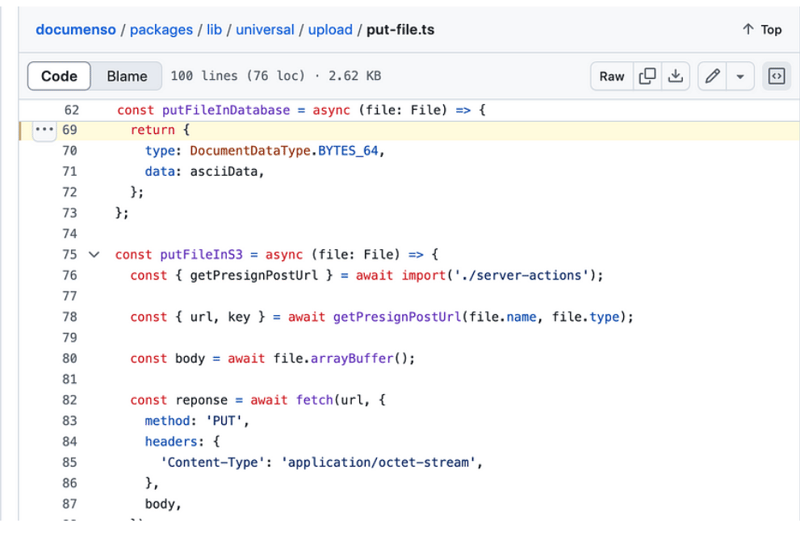
export const putfile = async (file: file) => {
  const next_public_upload_transport = env('next_public_upload_transport');

  return await match(next_public_upload_transport)
    .with('s3', async () => putfileins3(file))
    .otherwise(async () => putfileindatabase(file));
};
putfileins3
const putfileins3 = async (file: file) => {
  const { getpresignposturl } = await import('./server-actions');

  const { url, key } = await getpresignposturl(file.name, file.type);

  const body = await file.arraybuffer();

  const reponse = await fetch(url, {
    method: 'put',
    headers: {
      'content-type': 'application/octet-stream',
    },
    body,
  });

  if (!reponse.ok) {
    throw new error(
      `failed to upload file "${file.name}", failed with status code ${reponse.status}`,
    );
  }

  return {
    type: documentdatatype.s3_path,
    data: key,
  };
};
getpresignposturl
export const getPresignPostUrl = async (fileName: string, contentType: string) => {
  const client = getS3Client();

  const { getSignedUrl } = await import('@aws-sdk/s3-request-presigner');

  let token: JWT | null = null;

  try {
    const baseUrl = APP_BASE_URL() ?? 'http://localhost:3000';

    token = await getToken({
      req: new NextRequest(baseUrl, {
        headers: headers(),
      }),
    });
  } catch (err) {
    // Non server-component environment
  }

  // Get the basename and extension for the file
  const { name, ext } = path.parse(fileName);

  let key = `${alphaid(12)}/${slugify(name)}${ext}`;

  if (token) {
    key = `${token.id}/${key}`;
  }

  const putObjectCommand = new PutObjectCommand({
    Bucket: process.env.NEXT_PRIVATE_UPLOAD_BUCKET,
    Key: key,
    ContentType: contentType,
  });

  const url = await getSignedUrl(client, putObjectCommand, {
    expiresIn: ONE_HOUR / ONE_SECOND,
  });

  return { key, url };
};
比较
您在 documenso 中没有看到任何 post 请求。它使用名为 getsignedurl 的函数来获取 url,而
vercel 示例向 api/upload 路由发出 post 请求。在 vercel 示例中可以轻松找到输入元素,因为这只是一个示例,但可以找到 documenso
使用react-dropzone并且输入元素根据业务上下文定位。
关于我们:
在 thinkthroo,我们研究大型开源项目并提供架构指南。我们开发了使用 tailwind 构建的可重用组件,您可以在您的项目中使用它们。
我们提供 next.js、react 和 node 开发服务。
与我们预约会面讨论您的项目。
参考资料:
https://github.com/documenso/documenso/blob/main/packages/lib/universal/upload/put-file.ts#l69
https://github.com/vercel/examples/blob/main/solutions/aws-s3-image-upload/readme.md
https://github.com/vercel/examples/tree/main/solutions/aws-s3-image-upload
https://github.com/vercel/examples/blob/main/solutions/aws-s3-image-upload/app/page.tsx#l58c5-l76c12
https://github.com/vercel/examples/blob/main/solutions/aws-s3-image-upload/app/api/upload/route.ts
https://github.com/documenso/documenso/blob/main/packages/ui/primitives/document-dropzone.tsx#l157
https://react-dropzone.js.org/
https://github.com/documenso/documenso/blob/main/apps/web/src/app/(dashboard)/documents/upload-document.tsx#l61
https://github.com/documenso/documenso/blob/main/packages/lib/universal/upload/put-file.ts#l22
今天关于《Documenso 和 aws-smage-upload 示例之间的 Spload 功能比较》的内容介绍就到此结束,如果有什么疑问或者建议,可以在golang学习网公众号下多多回复交流;文中若有不正之处,也希望回复留言以告知!
 怎样用linux gedit指令进行文本替换
- 上一篇
- 怎样用linux gedit指令进行文本替换

- 下一篇
- 禾丰科技新材料及智能装备制造低碳产业园项目开工
-
- 文章 · 前端 | 1天前 |
- ARIA live 怎样播报异步状态变化
- 261浏览 收藏
-
- 文章 · 前端 | 1天前 | html · 可访问性 焦点管理 HTML inert 模态框背景禁用
- HTML inert 怎样暂时禁用背景区域交互
- 153浏览 收藏
-
- 文章 · 前端 | 1天前 | css · 表单 · 表单布局 CSS field-sizing 文本框自适应 textarea 自动高度
- CSS field-sizing 怎样让文本框高度随内容变化
- 328浏览 收藏
-
- 文章 · 前端 | 1天前 | css ·
- CSS 容器查询怎样按组件宽度切换布局
- 330浏览 收藏
-
- 文章 · 前端 | 1天前 |
- Service Worker 更新怎样控制接管时机
- 486浏览 收藏
-
- 文章 · 前端 | 1天前 | 前端 · javascript · request Cache API Cache.match Vary
- Cache API 怎样用完整请求区分缓存条目
- 432浏览 收藏
-
- 文章 · 前端 | 1天前 |
- IndexedDB 数据库升级怎样处理版本变更
- 483浏览 收藏
-
- 文章 · 前端 | 1天前 |
- Web Worker 怎样转移 ArrayBuffer 避免复制
- 408浏览 收藏
-
- 文章 · 前端 | 1天前 | 前端 · javascript · AbortController ReadableStream Streams API
- ReadableStream 取消后怎样释放请求
- 203浏览 收藏
-
- 文章 · 前端 | 1天前 | javascript · 前端工程 · ReadableStream 流式响应 TransformStream pipeThrough Streams API
- ReadableStream 怎样用 TransformStream 转换数据
- 151浏览 收藏
-
- 文章 · 前端 | 1天前 |
- Fetch 怎样用 AbortSignal.timeout 设置请求超时
- 166浏览 收藏
-
- 文章 · 前端 | 1天前 |
- Fetch keepalive 适合发送哪些小请求
- 397浏览 收藏
-

- 前端进阶之JavaScript设计模式
- 设计模式是开发人员在软件开发过程中面临一般问题时的解决方案,代表了最佳的实践。本课程的主打内容包括JS常见设计模式以及具体应用场景,打造一站式知识长龙服务,适合有JS基础的同学学习。
- 543次学习
-

- GO语言核心编程课程
- 本课程采用真实案例,全面具体可落地,从理论到实践,一步一步将GO核心编程技术、编程思想、底层实现融会贯通,使学习者贴近时代脉搏,做IT互联网时代的弄潮儿。
- 516次学习
-

- 简单聊聊mysql8与网络通信
- 如有问题加微信:Le-studyg;在课程中,我们将首先介绍MySQL8的新特性,包括性能优化、安全增强、新数据类型等,帮助学生快速熟悉MySQL8的最新功能。接着,我们将深入解析MySQL的网络通信机制,包括协议、连接管理、数据传输等,让
- 500次学习
-

- JavaScript正则表达式基础与实战
- 在任何一门编程语言中,正则表达式,都是一项重要的知识,它提供了高效的字符串匹配与捕获机制,可以极大的简化程序设计。
- 487次学习
-

- 从零制作响应式网站—Grid布局
- 本系列教程将展示从零制作一个假想的网络科技公司官网,分为导航,轮播,关于我们,成功案例,服务流程,团队介绍,数据部分,公司动态,底部信息等内容区块。网站整体采用CSSGrid布局,支持响应式,有流畅过渡和展现动画。
- 485次学习
-

- PubMedQA
- 深入了解PubMedQA生物医学问答数据集,涵盖其核心功能、使用方法及在临床决策、药物研发等场景的应用,助力提升NLP模型性能。
- 497次使用
-

- H2O EvalGPT
- H2O EvalGPT是H2O.ai推出的开源LLM评估平台,提供详细的大模型性能排行榜、行业特定基准测试及A/B测试功能,助您快速选择最适合项目的高性能大语言模型。
- 552次使用
-

- LMArena
- LMArena是加州大学伯克利分校推出的AI模型匿名评测平台。通过盲测投票机制,用户可对比不同大模型回答并生成实时排行榜,助力开发者优化模型及用户选择最佳AI工具。
- 578次使用
-

- HELM
- 深入了解斯坦福推出的HELM(Holistic Evaluation of Language Models)大模型评测体系。本文解析其核心功能、安装配置步骤及应用场景,涵盖准确性、公平性、鲁棒性等多维度指标,助力开发者全面优化语言模型性能。
- 532次使用
-

- MMBench
- MMBench是由上海人工智能实验室等机构联合推出的多模态基准测试平台,提供细粒度能力评估、大规模数据集及VLMEvalKit工具。本文详细介绍其核心功能、安装使用方法及应用场景,助力开发者全面评估多模态模型性能。
- 343次使用
-
- JavaScript函数定义及示例详解
- 2025-05-11 502浏览
-
- 智能体安全引领产业升级——国内AI安全产品市场深度分析
- 2026-08-21 501浏览
-
- CSS变量简化按钮悬停效果技巧
- 2026-05-31 501浏览
-
- JavaScript符号类型详解与应用
- 2026-05-31 501浏览
-
- HTML剪贴板复制粘贴怎么用
- 2026-05-26 501浏览