
【StoneDB】从库如何规避不支持的DML和DDL
来源:SegmentFault
2023-01-28 19:55:43
0浏览
收藏
怎么入门数据库编程?需要学习哪些知识点?这是新手们刚接触编程时常见的问题;下面golang学习网就来给大家整理分享一些知识点,希望能够给初学者一些帮助。本篇文章就来介绍《【StoneDB】从库如何规避不支持的DML和DDL》,涉及到MySQL、数据库,有需要的可以收藏一下
(以下情况仅针对StoneDB 1.0版本不支持的部分DML和DDL操作,StoneDB 2.0及以上版本将无需此类操作)
主从复制中,主库的任何更新都会同步到从库,如果从库不想重做主库的某个更新动作,可以使用以下两种方法进行规避。当然,最终带来的影响是主从环境数据不一致的问题。
以下的测试环境中,主库是 InnoDB,从库是 StoneDB,在主库做从库不支持的 DML 或者 DDL。
从库执行 GTID 的空事务
###主库
mysql> show create table ttt\G
*************************** 1. row ***************************
       Table: ttt
Create Table: CREATE TABLE `ttt` (
  `id` int(11) NOT NULL,
  `name` varchar(5) DEFAULT NULL,
  PRIMARY KEY (`id`)
) ENGINE=InnoDB DEFAULT CHARSET=utf8mb4
1 row in set (0.00 sec)

mysql> select * from ttt;
+----+------+
| id | name |
+----+------+
|  1 | AAA  |
|  2 | BBB  |
|  3 | CCC  |
+----+------+
3 rows in set (0.00 sec)

###从库
mysql> show create table ttt\G
*************************** 1. row ***************************
       Table: ttt
Create Table: CREATE TABLE `ttt` (
  `id` int(11) NOT NULL,
  `name` varchar(5) DEFAULT NULL,
  PRIMARY KEY (`id`)
) ENGINE=STONEDB DEFAULT CHARSET=utf8mb4
1 row in set (0.02 sec)

mysql> select * from ttt;
+----+------+
| id | name |
+----+------+
|  1 | AAA  |
|  2 | BBB  |
|  3 | CCC  |
+----+------+
3 rows in set (0.00 sec)

###主库
mysql> delete from ttt where id=3;
Query OK, 1 row affected (0.00 sec)

mysql> select * from ttt;
+----+------+
| id | name |
+----+------+
|  1 | AAA  |
|  2 | BBB  |
+----+------+
2 rows in set (0.00 sec)

###从库
mysql> show slave status\G
*************************** 1. row ***************************
               Slave_IO_State: Waiting for master to send event
                  Master_Host: 192.168.30.101
                  Master_User: u_repl
                  Master_Port: 33306
                Connect_Retry: 60
              Master_Log_File: binlog.000002
          Read_Master_Log_Pos: 1053
               Relay_Log_File: ub01-relay-bin.000002
                Relay_Log_Pos: 993
        Relay_Master_Log_File: binlog.000002
             Slave_IO_Running: Yes
            Slave_SQL_Running: No
              Replicate_Do_DB:
          Replicate_Ignore_DB:
           Replicate_Do_Table:
       Replicate_Ignore_Table:
      Replicate_Wild_Do_Table:
  Replicate_Wild_Ignore_Table:
                   Last_Errno: 1031
                   Last_Error: Error 'Table storage engine for 'ttt' doesn't have this option' on query. Default database: 'db'. Query: 'delete from ttt where id=3'
                 Skip_Counter: 0
          Exec_Master_Log_Pos: 786
              Relay_Log_Space: 1466
              Until_Condition: None
               Until_Log_File:
                Until_Log_Pos: 0
           Master_SSL_Allowed: No
           Master_SSL_CA_File:
           Master_SSL_CA_Path:
              Master_SSL_Cert:
            Master_SSL_Cipher:
               Master_SSL_Key:
        Seconds_Behind_Master: NULL
Master_SSL_Verify_Server_Cert: No
                Last_IO_Errno: 0
                Last_IO_Error:
               Last_SQL_Errno: 1031
               Last_SQL_Error: Error 'Table storage engine for 'ttt' doesn't have this option' on query. Default database: 'db'. Query: 'delete from ttt where id=3'
  Replicate_Ignore_Server_Ids:
             Master_Server_Id: 101
                  Master_UUID: ae40cabd-efb2-11ec-ac20-44a84203989a
             Master_Info_File: /data/stonedb/install/data/master.info
                    SQL_Delay: 0
          SQL_Remaining_Delay: NULL
      Slave_SQL_Running_State:
           Master_Retry_Count: 86400
                  Master_Bind:
      Last_IO_Error_Timestamp:
     Last_SQL_Error_Timestamp: 220729 02:26:29
               Master_SSL_Crl:
           Master_SSL_Crlpath:
           Retrieved_Gtid_Set: ae40cabd-efb2-11ec-ac20-44a84203989a:1-4
            Executed_Gtid_Set: 4ddecc1a-ee49-11ec-96fe-f219e7257407:1,
ae40cabd-efb2-11ec-ac20-44a84203989a:1-3
                Auto_Position: 1
         Replicate_Rewrite_DB:
                 Channel_Name:
           Master_TLS_Version:
1 row in set (0.00 sec)

mysql> select * from ttt;
+----+------+
| id | name |
+----+------+
|  1 | AAA  |
|  2 | BBB  |
|  3 | CCC  |
+----+------+
3 rows in set (0.00 sec)

主库执行 delete后,由于 StoneDB 不支持 delete,从库会有报错,并且主从复制中断。
下一步需要在主库找到执行 delete操作的gtid值。

###主库
mysql> show binary logs;
+---------------+-----------+
| Log_name      | File_size |
+---------------+-----------+
| binlog.000001 |       177 |
| binlog.000002 |      1053 |
+---------------+-----------+
2 rows in set (0.00 sec)

mysql> show binlog events in '/data/stonedb/install/binlog/binlog.000002';
+---------------+------+----------------+-----------+-------------+-------------------------------------------------------------------+
| Log_name      | Pos  | Event_type     | Server_id | End_log_pos | Info                                                              |
+---------------+------+----------------+-----------+-------------+-------------------------------------------------------------------+
| binlog.000002 |    4 | Format_desc    |       101 |         123 | Server ver: 5.7.36-StoneDB-log, Binlog ver: 4                     |
| binlog.000002 |  123 | Previous_gtids |       101 |         154 |                                                                   |
| binlog.000002 |  154 | Gtid           |       101 |         219 | SET @@SESSION.GTID_NEXT= 'ae40cabd-efb2-11ec-ac20-44a84203989a:1' |
| binlog.000002 |  219 | Query          |       101 |         307 | create database db                                                |
| binlog.000002 |  307 | Gtid           |       101 |         372 | SET @@SESSION.GTID_NEXT= 'ae40cabd-efb2-11ec-ac20-44a84203989a:2' |
| binlog.000002 |  372 | Query          |       101 |         494 | use `db`; create table ttt(id int primary key,name varchar(5))    |
| binlog.000002 |  494 | Gtid           |       101 |         559 | SET @@SESSION.GTID_NEXT= 'ae40cabd-efb2-11ec-ac20-44a84203989a:3' |
| binlog.000002 |  559 | Query          |       101 |         634 | BEGIN                                                             |
| binlog.000002 |  634 | Query          |       101 |         755 | use `db`; insert into ttt values(1,'AAA'),(2,'BBB'),(3,'CCC')     |
| binlog.000002 |  755 | Xid            |       101 |         786 | COMMIT /* xid=20 */                                               |
| binlog.000002 |  786 | Gtid           |       101 |         851 | SET @@SESSION.GTID_NEXT= 'ae40cabd-efb2-11ec-ac20-44a84203989a:4' |
| binlog.000002 |  851 | Query          |       101 |         926 | BEGIN                                                             |
| binlog.000002 |  926 | Query          |       101 |        1022 | use `db`; delete from ttt where id=3                              |
| binlog.000002 | 1022 | Xid            |       101 |        1053 | COMMIT /* xid=28 */                                               |
+---------------+------+----------------+-----------+-------------+-------------------------------------------------------------------+
14 rows in set (0.00 sec)

如果是在生产环境找主库 delete 操作的 gtid 值,需要知道哪个时间点,然后用 mysqlbinlog 解析binlog。
这里由于是做测试,可以简单快递的找到 delete 操作的 gtid 值,ae40cabd-efb2-11ec-ac20-44a84203989a:4。
gtid 值由参数 server_uuid 和事务 id 组成,标识一个这个操作的唯一性。

###从库
set gtid_next='ae40cabd-efb2-11ec-ac20-44a84203989a:4';
begin;
commit;
set gtid_next=automatic;
start slave;

mysql> show slave status\G
*************************** 1. row ***************************
               Slave_IO_State: Waiting for master to send event
                  Master_Host: 192.168.30.101
                  Master_User: u_repl
                  Master_Port: 33306
                Connect_Retry: 60
              Master_Log_File: binlog.000002
          Read_Master_Log_Pos: 1053
               Relay_Log_File: ub01-relay-bin.000002
                Relay_Log_Pos: 1260
        Relay_Master_Log_File: binlog.000002
             Slave_IO_Running: Yes
            Slave_SQL_Running: Yes
              Replicate_Do_DB:
          Replicate_Ignore_DB:
           Replicate_Do_Table:
       Replicate_Ignore_Table:
      Replicate_Wild_Do_Table:
  Replicate_Wild_Ignore_Table:
                   Last_Errno: 0
                   Last_Error:
                 Skip_Counter: 0
          Exec_Master_Log_Pos: 1053
              Relay_Log_Space: 1466
              Until_Condition: None
               Until_Log_File:
                Until_Log_Pos: 0
           Master_SSL_Allowed: No
           Master_SSL_CA_File:
           Master_SSL_CA_Path:
              Master_SSL_Cert:
            Master_SSL_Cipher:
               Master_SSL_Key:
        Seconds_Behind_Master: 0
Master_SSL_Verify_Server_Cert: No
                Last_IO_Errno: 0
                Last_IO_Error:
               Last_SQL_Errno: 0
               Last_SQL_Error:
  Replicate_Ignore_Server_Ids:
             Master_Server_Id: 101
                  Master_UUID: ae40cabd-efb2-11ec-ac20-44a84203989a
             Master_Info_File: /data/stonedb/install/data/master.info
                    SQL_Delay: 0
          SQL_Remaining_Delay: NULL
      Slave_SQL_Running_State: Slave has read all relay log; waiting for more updates
           Master_Retry_Count: 86400
                  Master_Bind:
      Last_IO_Error_Timestamp:
     Last_SQL_Error_Timestamp:
               Master_SSL_Crl:
           Master_SSL_Crlpath:
           Retrieved_Gtid_Set: ae40cabd-efb2-11ec-ac20-44a84203989a:1-4
            Executed_Gtid_Set: 4ddecc1a-ee49-11ec-96fe-f219e7257407:1,
ae40cabd-efb2-11ec-ac20-44a84203989a:1-4
                Auto_Position: 1
         Replicate_Rewrite_DB:
                 Channel_Name:
           Master_TLS_Version:
1 row in set (0.00 sec)

mysql> select * from ttt;
+----+------+
| id | name |
+----+------+
|  1 | AAA  |
|  2 | BBB  |
|  3 | CCC  |
+----+------+
3 rows in set (0.00 sec)

利用 gtid 跳过一个空事务后,主从复制的线程已经正常启动,但由于 StoneDB 不支持 delete,现在主从环境数据是不一致的。

###主库
mysql> insert into ttt values(4,'DDD');
Query OK, 1 row affected (0.00 sec)

mysql> select * from ttt;
+----+------+
| id | name |
+----+------+
|  1 | AAA  |
|  2 | BBB  |
|  4 | DDD  |
+----+------+
3 rows in set (0.00 sec)

###从库
mysql> select * from ttt;
+----+------+
| id | name |
+----+------+
|  1 | AAA  |
|  2 | BBB  |
|  3 | CCC  |
|  4 | DDD  |
+----+------+
4 rows in set (0.00 sec)

主从复制的线程启动后,主库的更新,从库同步正常。
如果觉得在主库找 delete 的 gtid 值麻烦,在主库执行 delete 前,可以指定 delete 的 gtid 值。在从库还是根据这个 gtid 值执行空事务。
###
mysql> show variables like 'server_uuid';
+---------------+--------------------------------------+
| Variable_name | Value                                |
+---------------+--------------------------------------+
| server_uuid   | ae40cabd-efb2-11ec-ac20-44a84203989a |
+---------------+--------------------------------------+
1 row in set (0.01 sec)

mysql> set gtid_next='ae40cabd-efb2-11ec-ac20-44a84203989a:100';
Query OK, 0 rows affected (0.00 sec)

mysql> begin;
Query OK, 0 rows affected (0.00 sec)

mysql> delete from ttt where id=1;
Query OK, 1 row affected (0.00 sec)

mysql> commit;
Query OK, 0 rows affected (0.00 sec)

mysql> set gtid_next=automatic;
Query OK, 0 rows affected (0.00 sec)

###从库
set gtid_next='ae40cabd-efb2-11ec-ac20-44a84203989a:100';
begin;
commit;
set gtid_next=automatic;
start slave;
关闭当前线程的binlog
###主库
mysql> show create table ttt\G
*************************** 1. row ***************************
       Table: ttt
Create Table: CREATE TABLE `ttt` (
  `id` int(11) NOT NULL AUTO_INCREMENT,
  `name` varchar(5) DEFAULT NULL,
  PRIMARY KEY (`id`)
) ENGINE=InnoDB AUTO_INCREMENT=3 DEFAULT CHARSET=utf8mb4
1 row in set (0.00 sec)

mysql> select * from ttt;
+----+------+
| id | name |
+----+------+
|  1 | AAA  |
|  2 | BBB  |
+----+------+
2 rows in set (0.00 sec)

###从库
mysql> show create table ttt\G
*************************** 1. row ***************************
       Table: ttt
Create Table: CREATE TABLE `ttt` (
  `id` int(11) NOT NULL AUTO_INCREMENT,
  `name` varchar(5) DEFAULT NULL,
  PRIMARY KEY (`id`)
) ENGINE=STONEDB DEFAULT CHARSET=utf8mb4
1 row in set (0.00 sec)

mysql> select * from ttt;
+----+------+
| id | name |
+----+------+
|  1 | AAA  |
|  2 | BBB  |
+----+------+
2 rows in set (0.00 sec)

###主库
mysql> set sql_log_bin=off;
Query OK, 0 rows affected (0.00 sec)

mysql> alter table ttt modify name varchar(10);
Query OK, 0 rows affected (0.00 sec)
Records: 0  Duplicates: 0  Warnings: 0

mysql> show create table ttt\G
*************************** 1. row ***************************
       Table: ttt
Create Table: CREATE TABLE `ttt` (
  `id` int(11) NOT NULL AUTO_INCREMENT,
  `name` varchar(10) DEFAULT NULL,
  PRIMARY KEY (`id`)
) ENGINE=InnoDB AUTO_INCREMENT=3 DEFAULT CHARSET=utf8mb4
1 row in set (0.00 sec)

###从库
mysql> show slave status\G
*************************** 1. row ***************************
               Slave_IO_State: Waiting for master to send event
                  Master_Host: 192.168.30.101
                  Master_User: u_repl
                  Master_Port: 33306
                Connect_Retry: 60
              Master_Log_File: binlog.000002
          Read_Master_Log_Pos: 2288
               Relay_Log_File: ub01-relay-bin.000002
                Relay_Log_Pos: 2495
        Relay_Master_Log_File: binlog.000002
             Slave_IO_Running: Yes
            Slave_SQL_Running: Yes
              Replicate_Do_DB:
          Replicate_Ignore_DB:
           Replicate_Do_Table:
       Replicate_Ignore_Table:
      Replicate_Wild_Do_Table:
  Replicate_Wild_Ignore_Table:
                   Last_Errno: 0
                   Last_Error:
                 Skip_Counter: 0
          Exec_Master_Log_Pos: 2288
              Relay_Log_Space: 2701
              Until_Condition: None
               Until_Log_File:
                Until_Log_Pos: 0
           Master_SSL_Allowed: No
           Master_SSL_CA_File:
           Master_SSL_CA_Path:
              Master_SSL_Cert:
            Master_SSL_Cipher:
               Master_SSL_Key:
        Seconds_Behind_Master: 0
Master_SSL_Verify_Server_Cert: No
                Last_IO_Errno: 0
                Last_IO_Error:
               Last_SQL_Errno: 0
               Last_SQL_Error:
  Replicate_Ignore_Server_Ids:
             Master_Server_Id: 101
                  Master_UUID: ae40cabd-efb2-11ec-ac20-44a84203989a
             Master_Info_File: /data/stonedb/install/data/master.info
                    SQL_Delay: 0
          SQL_Remaining_Delay: NULL
      Slave_SQL_Running_State: Slave has read all relay log; waiting for more updates
           Master_Retry_Count: 86400
                  Master_Bind:
      Last_IO_Error_Timestamp:
     Last_SQL_Error_Timestamp:
               Master_SSL_Crl:
           Master_SSL_Crlpath:
           Retrieved_Gtid_Set: ae40cabd-efb2-11ec-ac20-44a84203989a:1-8:100
            Executed_Gtid_Set: 4ddecc1a-ee49-11ec-96fe-f219e7257407:1-3,
ae40cabd-efb2-11ec-ac20-44a84203989a:1-8:100
                Auto_Position: 1
         Replicate_Rewrite_DB:
                 Channel_Name:
           Master_TLS_Version:
1 row in set (0.00 sec)

mysql> show create table ttt\G
*************************** 1. row ***************************
       Table: ttt
Create Table: CREATE TABLE `ttt` (
  `id` int(11) NOT NULL AUTO_INCREMENT,
  `name` varchar(5) DEFAULT NULL,
  PRIMARY KEY (`id`)
) ENGINE=STONEDB DEFAULT CHARSET=utf8mb4
1 row in set (0.00 sec)

主库关闭当前线程的binlog,对表做DDL,将字段 name 的长度扩大。
主从复制正常,从库表的字段 name 的长度不变。

###主库
开启新的线程,注意一点是开启新的线程!!!
mysql> insert into ttt(name) values('CCC');
Query OK, 1 row affected (0.00 sec)

mysql> select * from ttt;
+----+------+
| id | name |
+----+------+
|  1 | AAA  |
|  2 | BBB  |
|  3 | CCC  |
+----+------+
3 rows in set (0.00 sec)

###从库
mysql> select * from ttt;
+----+------+
| id | name |
+----+------+
|  1 | AAA  |
|  2 | BBB  |
|  3 | CCC  |
+----+------+
3 rows in set (0.00 sec)

sql_log_bin=off,关闭的是当前线程的binlog,不影响其他线程的任何更新。
以上两种方法都可以规避从库不想重做主库的某个更新动作,目的是让从库遇到不支持的操作时可以让主从复制的线程正常工作,但带来的问题是主从环境数据不一致。
今天关于《【StoneDB】从库如何规避不支持的DML和DDL》的内容就介绍到这里了,是不是学起来一目了然!想要了解更多关于mysql的内容请关注golang学习网公众号!
版本声明
本文转载于:SegmentFault 如有侵犯,请联系study_golang@163.com删除
 【StoneDB研发日志】列式存储 delete方案调研
- 上一篇
- 【StoneDB研发日志】列式存储 delete方案调研
- 下一篇
- 一文搞懂│mysql 中的备份恢复、分区分表、主从复制、读写分离
查看更多
最新文章
-
- 数据库 · MySQL | 3小时前 |
- MySQL JSON_TABLE 展开数组时如何保留缺失字段
- 501浏览 收藏
-
- 数据库 · MySQL | 4小时前 |
- MySQL CTE 多次引用时为什么可能重复物化
- 237浏览 收藏
-
- 数据库 · MySQL | 6小时前 | MySQL · 执行计划 · 索引优化 · mysql explain OR条件 Index Merge
- MySQL OR 条件什么时候会选择 Index Merge
- 373浏览 收藏
-
- 数据库 · MySQL | 9小时前 |
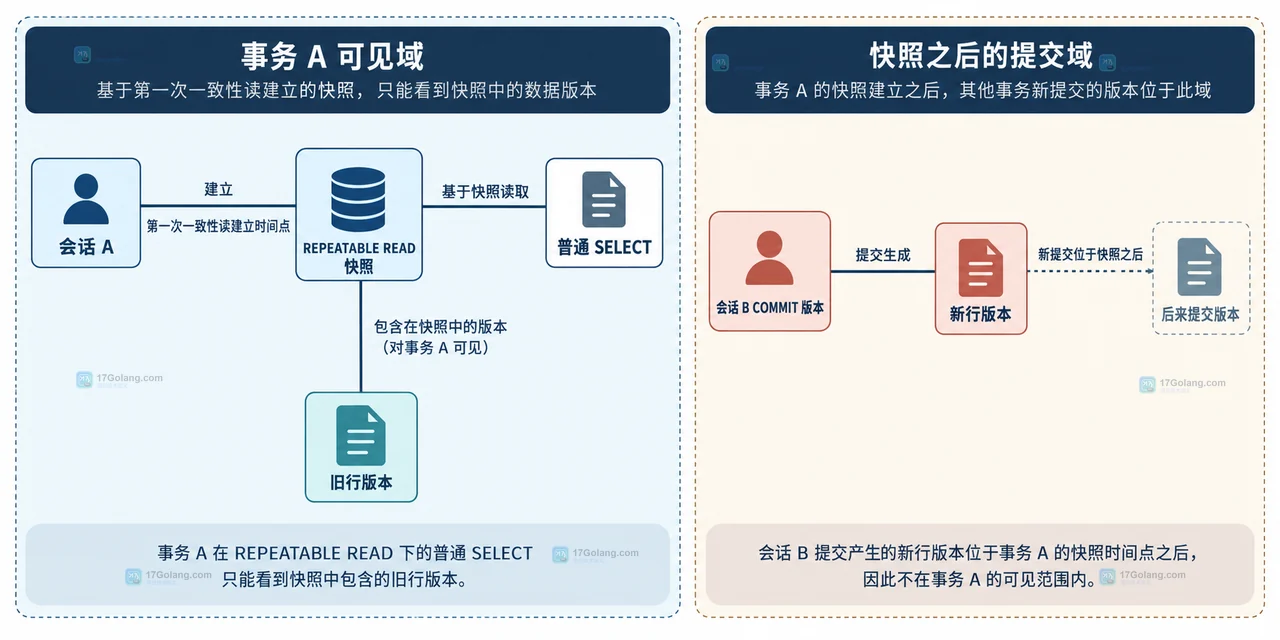
- MySQL 事务隔离级别下普通 SELECT 为什么看不到新提交
- 385浏览 收藏
-
- 数据库 · MySQL | 10小时前 | MySQL · 索引 · 性能优化 · 执行计划 · mysql explain optimizer hint FORCE INDEX USE INDEX
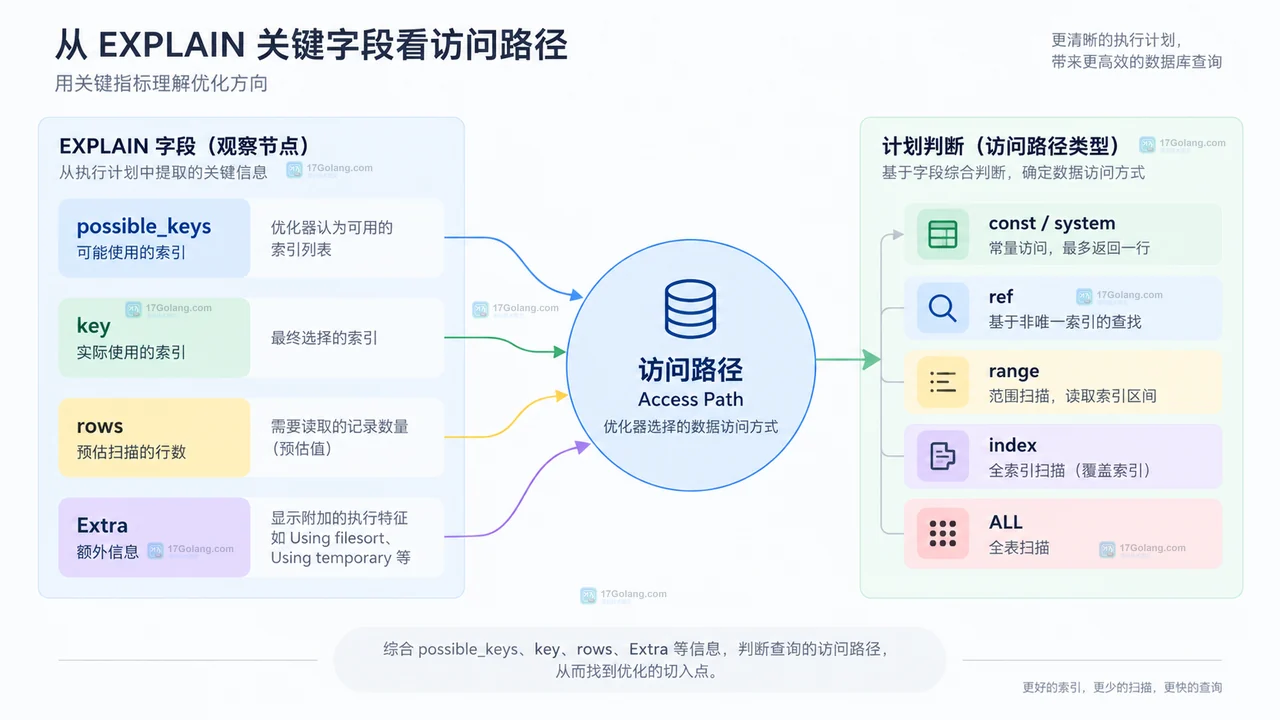
- MySQL optimizer hint 和 FORCE INDEX 怎么选择
- 478浏览 收藏
-
- 数据库 · MySQL | 11小时前 | MySQL · explain · 性能分析 · JSON执行计划 · 嵌套循环 · mysql 执行计划 EXPLAIN FORMAT=JSON nested_loop 查询成本
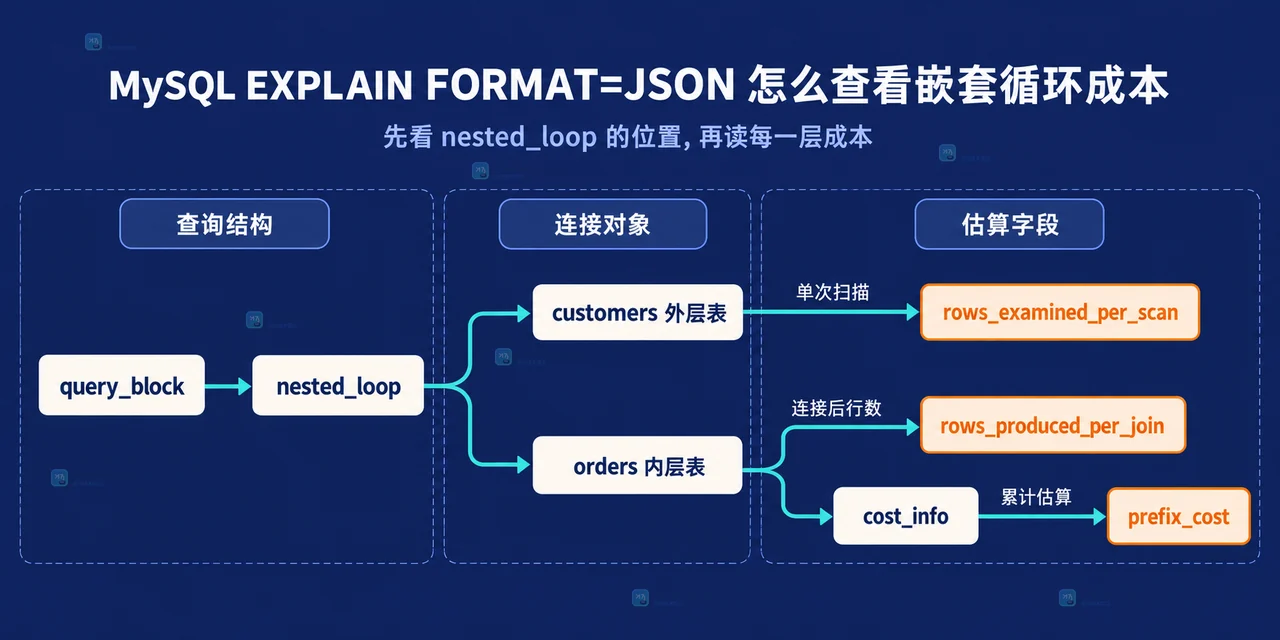
- MySQL EXPLAIN FORMAT=JSON 怎么查看嵌套循环成本
- 166浏览 收藏
-
- 数据库 · MySQL | 17小时前 |
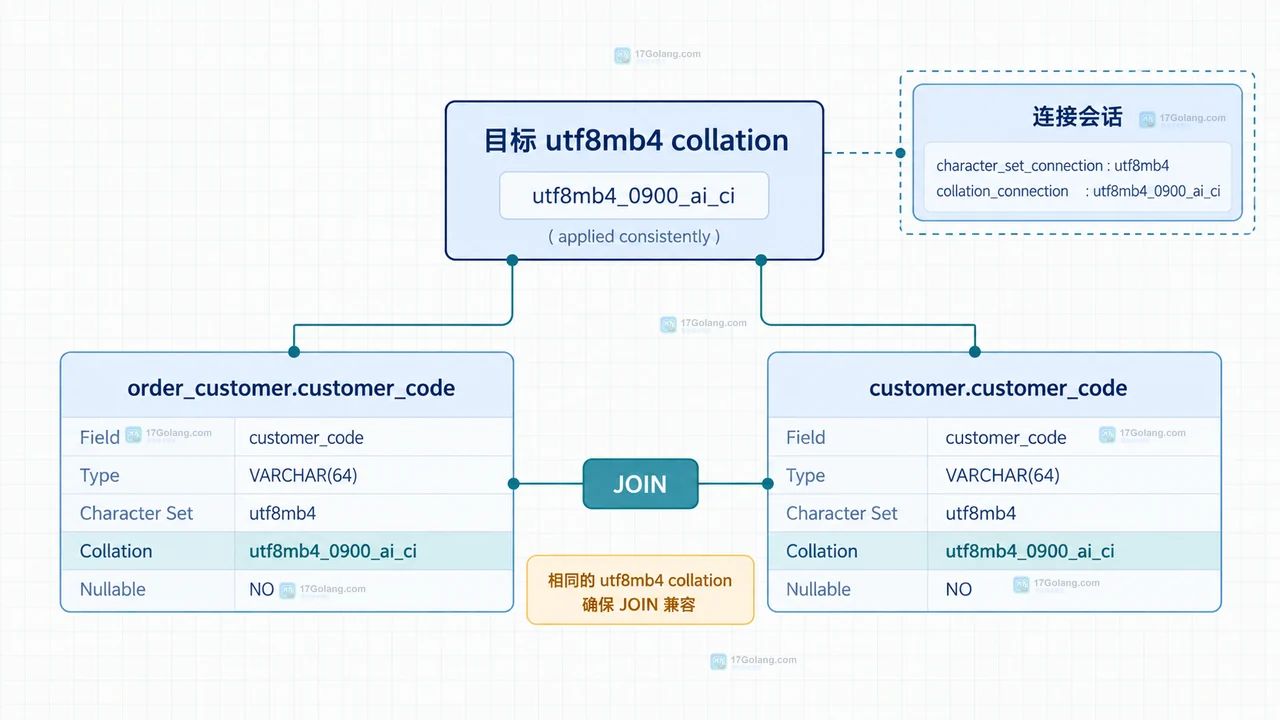
- MySQL collation 不一致导致 JOIN 报错怎么统一
- 446浏览 收藏
-
- 数据库 · MySQL | 1天前 |
- MySQL 递归 CTE 生成日期序列时为什么列类型会截断
- 104浏览 收藏
-
- 数据库 · MySQL | 1天前 |
- MySQL 递归 CTE 遍历树数据时怎么防止无限循环
- 142浏览 收藏
查看更多
课程推荐
-

- 前端进阶之JavaScript设计模式
- 设计模式是开发人员在软件开发过程中面临一般问题时的解决方案,代表了最佳的实践。本课程的主打内容包括JS常见设计模式以及具体应用场景,打造一站式知识长龙服务,适合有JS基础的同学学习。
- 543次学习
-

- GO语言核心编程课程
- 本课程采用真实案例,全面具体可落地,从理论到实践,一步一步将GO核心编程技术、编程思想、底层实现融会贯通,使学习者贴近时代脉搏,做IT互联网时代的弄潮儿。
- 516次学习
-

- 简单聊聊mysql8与网络通信
- 如有问题加微信:Le-studyg;在课程中,我们将首先介绍MySQL8的新特性,包括性能优化、安全增强、新数据类型等,帮助学生快速熟悉MySQL8的最新功能。接着,我们将深入解析MySQL的网络通信机制,包括协议、连接管理、数据传输等,让
- 500次学习
-

- JavaScript正则表达式基础与实战
- 在任何一门编程语言中,正则表达式,都是一项重要的知识,它提供了高效的字符串匹配与捕获机制,可以极大的简化程序设计。
- 487次学习
-

- 从零制作响应式网站—Grid布局
- 本系列教程将展示从零制作一个假想的网络科技公司官网,分为导航,轮播,关于我们,成功案例,服务流程,团队介绍,数据部分,公司动态,底部信息等内容区块。网站整体采用CSSGrid布局,支持响应式,有流畅过渡和展现动画。
- 485次学习
查看更多
AI推荐
-

- H2O EvalGPT
- H2O EvalGPT是H2O.ai推出的开源LLM评估平台,提供详细的大模型性能排行榜、行业特定基准测试及A/B测试功能,助您快速选择最适合项目的高性能大语言模型。
- 70次使用
-
- SuperCLUE
- SuperCLUE是权威的中文大语言模型综合评测基准,涵盖语言理解、知识应用、AI Agent智能体及安全性等12项核心能力。通过多轮对话与客观测试,定期发布榜单与技术报告,为模型研发、优化及行业选型提供科学依据。
- 227次使用
-

- C-Eval
- 深入了解C-Eval中文评估套件,涵盖52个学科与4级难度。本文详解其功能特点、Zero-shot/Few-shot使用方法及代码示例,助您全面评测LLM中文理解与泛化能力。
- 153次使用
-

- AI Prompt Library
- 探索AI Prompt Library免费资源库,涵盖营销、写作及多场景AI提示词。兼容ChatGPT、Claude等工具,一键复制优化输出,提升工作效率。
- 83次使用
-

- Generrated
- Generrated汇集9300+张DALL·E生成图像及对应提示词,支持查看完整图集、对比DALL·E 2与3版本差异,是AI绘图新手学习Prompt设计与获取创作灵感的实用工具。
- 63次使用
查看更多
相关文章
-
- MySQL 明明加了索引,为什么查询还是很慢?先查这 6 个点
- 2026-06-27 374浏览
-
- 接口返回的数据和数据库不一致怎么办?按数据生命周期排查
- 2026-06-27 398浏览
-
- golang MySQL实现对数据库表存储获取操作示例
- 2022-12-22 499浏览
-
- golang 基于 mysql 简单实现分布式读写锁
- 2023-01-07 384浏览
-
- 详解如何利用GORM实现MySQL事务
- 2023-01-07 184浏览


