
将数据加载到 Neo4j 中
来源:dev.to
2024-11-27 10:10:39
0浏览
收藏
大家好,我们又见面了啊~本文《将数据加载到 Neo4j 中》的内容中将会涉及到等等。如果你正在学习文章相关知识,欢迎关注我,以后会给大家带来更多文章相关文章,希望我们能一起进步!下面就开始本文的正式内容~
在上一篇博客中,我们了解了如何使用 2 个插件 apoc 和图形数据科学库 - gds 在本地安装和设置 neo4j。在这篇博客中,我将获取一个玩具数据集(电子商务网站中的产品)并将其存储在 neo4j 中。
为 neo4j 分配足够的内存
在开始加载数据之前,如果您的用例中有大量数据,请确保为 neo4j 分配了足够的内存。为此:
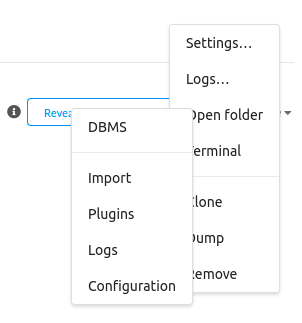
- 点击打开右侧的三个点

- 点击
- 打开文件夹-> 配置
- 点击
- neo4j.conf
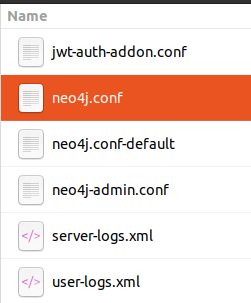
- 在neo4j.conf中搜索
- heap,取消第77、78行的注释,并将256m更改为2048m,这样可以确保为neo4j中的数据存储分配2048mb。

- 图有两个主要组成部分:节点和关系,让我们先创建节点,然后再建立关系。
- 我正在使用的数据在这里 - data
- 使用这里提供的requirements.txt来创建一个python虚拟环境-requirements.txt
- 让我们定义各种函数来推送数据。
- 导入必要的库
import pandas as pd
from neo4j import graphdatabase
from openai import openai
- 我们将使用 openai 来生成嵌入
client = openai(api_key="")
product_data_df = pd.read_csv('../data/product_data.csv')
- 生成嵌入
def get_embedding(text):
    """
    used to generate embeddings using openai embeddings model
    :param text: str - text that needs to be converted to embeddings
    :return: embedding
    """
    model = "text-embedding-3-small"
    text = text.replace("\n", " ")
    return client.embeddings.create(input=[text], model=model).data[0].embedding
- 根据我们的数据集,我们可以有两个唯一的节点标签,
- category:产品类别,product:产品名称。让我们创建类别标签,neo4j 提供了一种称为属性的东西,您可以将它们想象为特定节点的元数据。这里 name 和 embedding 是属性。因此,我们将类别名称及其相应的嵌入存储在数据库中。
def create_category(product_data_df):
    """
    used to generate queries for creating category nodes in neo4j
    :param product_data_df: pandas dataframe - data
    :return: query_list: list - list containing all create node queries for category
    """
    cat_query = """create (a:category {name: '%s', embedding: %s})"""
    distinct_category = product_data_df['category'].unique()
    query_list = []
    for category in distinct_category:
        embedding = get_embedding(category)
        query_list.append(cat_query % (category, embedding))
    return query_list
- 类似地,我们可以创建产品节点,这里的属性是
- name,description,price,warranty_period,available_stock,review_ rating,product_release_date,embedding
def create_product(product_data_df):
    """
    used to generate queries for creating product nodes in neo4j
    :param product_data_df: pandas dataframe - data
    :return: query_list: list - list containing all create node queries for product
    """
    product_query = """create (a:product {name: '%s', description: '%s', price: %d, warranty_period: %d,
    available_stock: %d, review_rating: %f, product_release_date: date('%s'), embedding: %s})"""
    query_list = []
    for idx, row in product_data_df.iterrows():
        embedding = get_embedding(row['product name'] + " - " + row['description'])
        query_list.append(product_query % (row['product name'], row['description'], int(row['price (inr)']),
                                           int(row['warranty period (years)']), int(row['stock']),
                                           float(row['review rating']), str(row['product release date']), embedding))
    return query_list
- 现在让我们创建另一个函数来执行上述两个函数生成的查询。适当更新您的用户名和密码。
def execute_bulk_query(query_list):
    """
    executes queries is a list one by one
    :param query_list: list - list of cypher queries
    :return: none
    """
    url = "bolt://localhost:7687"
    auth = ("neo4j", "neo4j@123")

    with graphdatabase.driver(url, auth=auth) as driver:
        with driver.session() as session:
            for query in query_list:
                try:
                    session.run(query)
                except exception as error:
                    print(f"error in executing query - {query}, error - {error}")
- 完整代码
import pandas as pd
from neo4j import graphdatabase
from openai import openai

client = openai(api_key="")
product_data_df = pd.read_csv('../data/product_data.csv')


def preprocessing(df, columns_to_replace):
    """
    used to preprocess certain column in dataframe
    :param df: pandas dataframe - data
    :param columns_to_replace: list - column name list
    :return: df: pandas dataframe - processed data
    """
    df[columns_to_replace] = df[columns_to_replace].apply(lambda col: col.str.replace("'s", "s"))
    df[columns_to_replace] = df[columns_to_replace].apply(lambda col: col.str.replace("'", ""))
    return df


def get_embedding(text):
    """
    used to generate embeddings using openai embeddings model
    :param text: str - text that needs to be converted to embeddings
    :return: embedding
    """
    model = "text-embedding-3-small"
    text = text.replace("\n", " ")
    return client.embeddings.create(input=[text], model=model).data[0].embedding


def create_category(product_data_df):
    """
    used to generate queries for creating category nodes in neo4j
    :param product_data_df: pandas dataframe - data
    :return: query_list: list - list containing all create node queries for category
    """
    cat_query = """create (a:category {name: '%s', embedding: %s})"""
    distinct_category = product_data_df['category'].unique()
    query_list = []
    for category in distinct_category:
        embedding = get_embedding(category)
        query_list.append(cat_query % (category, embedding))
    return query_list


def create_product(product_data_df):
    """
    used to generate queries for creating product nodes in neo4j
    :param product_data_df: pandas dataframe - data
    :return: query_list: list - list containing all create node queries for product
    """
    product_query = """create (a:product {name: '%s', description: '%s', price: %d, warranty_period: %d,
    available_stock: %d, review_rating: %f, product_release_date: date('%s'), embedding: %s})"""
    query_list = []
    for idx, row in product_data_df.iterrows():
        embedding = get_embedding(row['product name'] + " - " + row['description'])
        query_list.append(product_query % (row['product name'], row['description'], int(row['price (inr)']),
                                           int(row['warranty period (years)']), int(row['stock']),
                                           float(row['review rating']), str(row['product release date']), embedding))
    return query_list


def execute_bulk_query(query_list):
    """
    executes queries is a list one by one
    :param query_list: list - list of cypher queries
    :return: none
    """
    url = "bolt://localhost:7687"
    auth = ("neo4j", "neo4j@123")

    with graphdatabase.driver(url, auth=auth) as driver:
        with driver.session() as session:
            for query in query_list:
                try:
                    session.run(query)
                except exception as error:
                    print(f"error in executing query - {query}, error - {error}")

# preprocessing
product_data_df = preprocessing(product_data_df, ['product name', 'description'])

# create category
query_list = create_category(product_data_df)
execute_bulk_query(query_list)

# create product
query_list = create_product(product_data_df)
execute_bulk_query(query_list)
- 我们将在
- category 和 product 之间创建关系,该关系的名称为 category_contains_product
from neo4j import GraphDatabase
import pandas as pd

product_data_df = pd.read_csv('../data/product_data.csv')


def preprocessing(df, columns_to_replace):
    """
    Used to preprocess certain column in dataframe
    :param df: pandas dataframe - data
    :param columns_to_replace: list - column name list
    :return: df: pandas dataframe - processed data
    """
    df[columns_to_replace] = df[columns_to_replace].apply(lambda col: col.str.replace("'s", "s"))
    df[columns_to_replace] = df[columns_to_replace].apply(lambda col: col.str.replace("'", ""))
    return df


def create_category_food_relationship_query(product_data_df):
    """
    Used to create relationship between category and products
    :param product_data_df: dataframe - data
    :return: query_list: list - cypher queries
    """
    query = """MATCH (c:Category {name: '%s'}), (p:Product {name: '%s'}) CREATE (c)-[:CATEGORY_CONTAINS_PRODUCT]->(p)"""
    query_list = []
    for idx, row in product_data_df.iterrows():
        query_list.append(query % (row['Category'], row['Product Name']))
    return query_list


def execute_bulk_query(query_list):
    """
    Executes queries is a list one by one
    :param query_list: list - list of cypher queries
    :return: None
    """
    url = "bolt://localhost:7687"
    auth = ("neo4j", "neo4j@123")

    with GraphDatabase.driver(url, auth=auth) as driver:
        with driver.session() as session:
            for query in query_list:
                try:
                    session.run(query)
                except Exception as error:
                    print(f"Error in executing query - {query}, Error - {error}")


# PREPROCESSING
product_data_df = preprocessing(product_data_df, ['Product Name', 'Description'])

# CATEGORY - FOOD RELATIONSHIP
query_list = create_category_food_relationship_query(product_data_df)
execute_bulk_query(query_list)
- 通过使用 match 查询来匹配已经创建的节点,我们在它们之间建立关系。
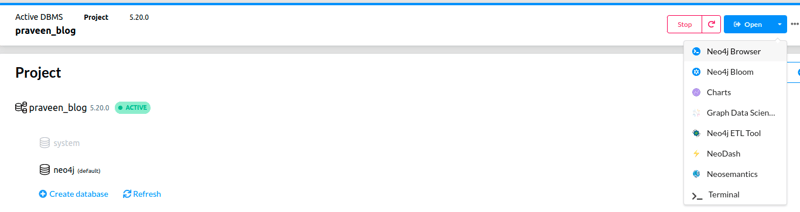
将鼠标悬停在
open图标上,然后单击neo4j浏览器以可视化我们创建的节点。
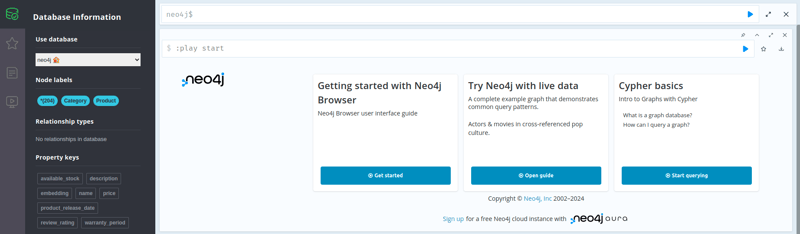
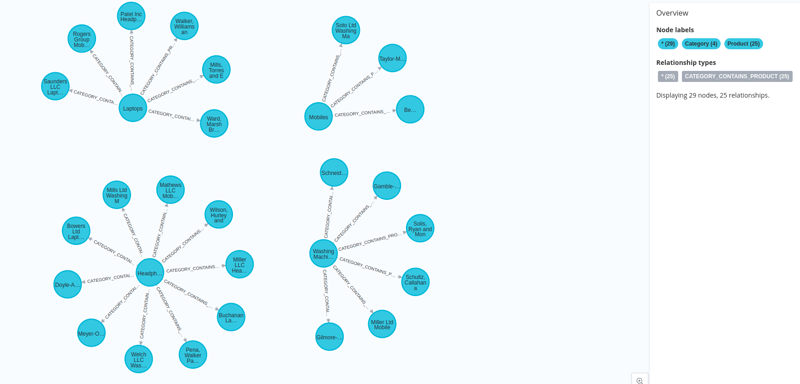
在接下来的博客中,我们将看到如何使用 python 构建图形查询引擎并使用获取的数据进行增强生成。
linkedin - https://www.linkedin.com/in/praveenr2998/
github - https://github.com/praveenr2998/creating-lightweight-rag-systems-with-graphs/tree/main/push_data_to_db
今天带大家了解了的相关知识,希望对你有所帮助;关于文章的技术知识我们会一点点深入介绍,欢迎大家关注golang学习网公众号,一起学习编程~
版本声明
本文转载于:dev.to 如有侵犯,请联系study_golang@163.com删除
 如何优化树形结构的动态展示以避免卡顿?
- 上一篇
- 如何优化树形结构的动态展示以避免卡顿?
- 下一篇
- Win10开机太快无法进入bios怎么办 Win10开机太快无法进入bios的解决方法
查看更多
最新文章
-
- 文章 · python教程 | 20小时前 |
- Python logging lastResort 怎样处理没有配置 handler 的日志
- 289浏览 收藏
-
- 文章 · python教程 | 20小时前 | 并发编程 · Python教程 · Python logging 后台线程 logging.handlers.QueueListener 日志关闭
- Python logging.handlers.QueueListener 怎样优雅停止后台日志线程
- 143浏览 收藏
-
- 文章 · python教程 | 20小时前 |
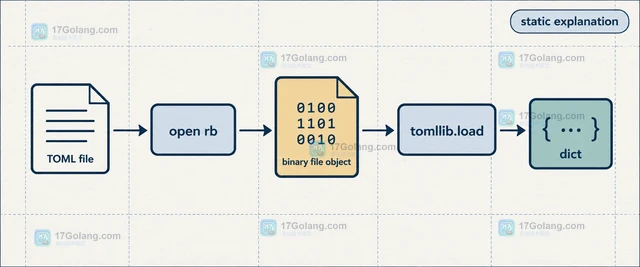
- Python tomllib 怎样读取二进制 TOML
- 114浏览 收藏
-
- 文章 · python教程 | 20小时前 | 文件处理 · Python教程 · Python 目录复制 shutil.copytree dirs_exist_ok 文件覆盖
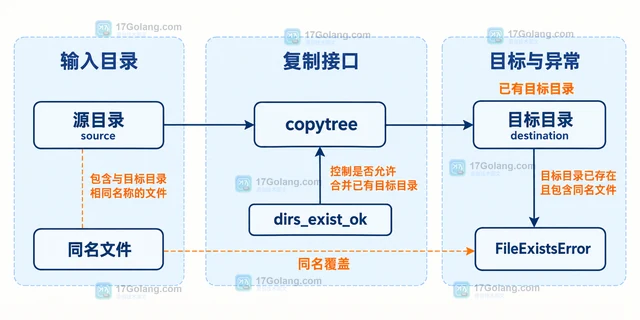
- Python shutil.copytree 怎样合并已有目标目录
- 165浏览 收藏
-
- 文章 · python教程 | 20小时前 |
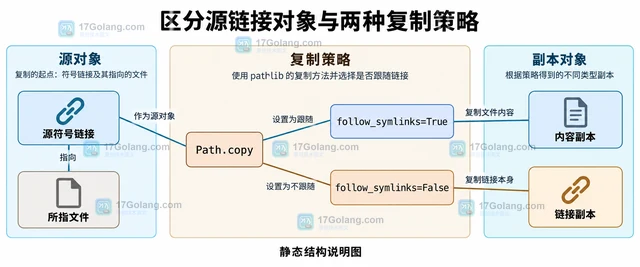
- Python pathlib 复制文件时怎样控制符号链接
- 478浏览 收藏
-
- 文章 · python教程 | 20小时前 |
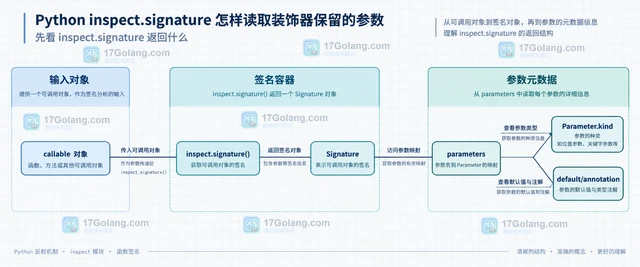
- Python inspect.signature 怎样读取装饰器保留的参数
- 298浏览 收藏
-
- 文章 · python教程 | 20小时前 |
- Python configparser 怎样转义值里的百分号
- 393浏览 收藏
-
- 文章 · python教程 | 20小时前 |
- Python asyncio.PriorityQueue 怎样保持相同优先级的稳定顺序
- 306浏览 收藏
-
- 文章 · python教程 | 21小时前 |
- Python asyncio.Runner 怎样复用同一个事件循环运行多个入口
- 204浏览 收藏
-
- 文章 · python教程 | 21小时前 |
- Python TaskGroup 怎样处理嵌套任务组异常
- 319浏览 收藏
查看更多
课程推荐
-

- 前端进阶之JavaScript设计模式
- 设计模式是开发人员在软件开发过程中面临一般问题时的解决方案,代表了最佳的实践。本课程的主打内容包括JS常见设计模式以及具体应用场景,打造一站式知识长龙服务,适合有JS基础的同学学习。
- 543次学习
-

- GO语言核心编程课程
- 本课程采用真实案例,全面具体可落地,从理论到实践,一步一步将GO核心编程技术、编程思想、底层实现融会贯通,使学习者贴近时代脉搏,做IT互联网时代的弄潮儿。
- 516次学习
-

- 简单聊聊mysql8与网络通信
- 如有问题加微信:Le-studyg;在课程中,我们将首先介绍MySQL8的新特性,包括性能优化、安全增强、新数据类型等,帮助学生快速熟悉MySQL8的最新功能。接着,我们将深入解析MySQL的网络通信机制,包括协议、连接管理、数据传输等,让
- 500次学习
-

- JavaScript正则表达式基础与实战
- 在任何一门编程语言中,正则表达式,都是一项重要的知识,它提供了高效的字符串匹配与捕获机制,可以极大的简化程序设计。
- 487次学习
-

- 从零制作响应式网站—Grid布局
- 本系列教程将展示从零制作一个假想的网络科技公司官网,分为导航,轮播,关于我们,成功案例,服务流程,团队介绍,数据部分,公司动态,底部信息等内容区块。网站整体采用CSSGrid布局,支持响应式,有流畅过渡和展现动画。
- 485次学习
查看更多
AI推荐
-

- PubMedQA
- 深入了解PubMedQA生物医学问答数据集,涵盖其核心功能、使用方法及在临床决策、药物研发等场景的应用,助力提升NLP模型性能。
- 485次使用
-

- H2O EvalGPT
- H2O EvalGPT是H2O.ai推出的开源LLM评估平台,提供详细的大模型性能排行榜、行业特定基准测试及A/B测试功能,助您快速选择最适合项目的高性能大语言模型。
- 541次使用
-

- LMArena
- LMArena是加州大学伯克利分校推出的AI模型匿名评测平台。通过盲测投票机制,用户可对比不同大模型回答并生成实时排行榜,助力开发者优化模型及用户选择最佳AI工具。
- 563次使用
-

- HELM
- 深入了解斯坦福推出的HELM(Holistic Evaluation of Language Models)大模型评测体系。本文解析其核心功能、安装配置步骤及应用场景,涵盖准确性、公平性、鲁棒性等多维度指标,助力开发者全面优化语言模型性能。
- 518次使用
-

- MMBench
- MMBench是由上海人工智能实验室等机构联合推出的多模态基准测试平台,提供细粒度能力评估、大规模数据集及VLMEvalKit工具。本文详细介绍其核心功能、安装使用方法及应用场景,助力开发者全面评估多模态模型性能。
- 333次使用
查看更多
相关文章
-
- Python sqlite3 Connection serialize 怎么导出数据库快照:备份窗口、内存占用与恢复校验
- 2026-08-26 501浏览
-
- Python监控网页状态:requests异常处理实战
- 2026-05-29 501浏览
-
- TensorFlow模型部署为API的TF Serving方法
- 2026-05-26 501浏览
-
- Python字符串编码转换:encode与decode详解
- 2026-05-16 501浏览
-
- TensorFlow裁剪无用算子方法详解
- 2026-05-15 501浏览