
mysql5.6主从搭建以及不同步问题详解
知识点掌握了,还需要不断练习才能熟练运用。下面golang学习网给大家带来一个数据库开发实战,手把手教大家学习《mysql5.6主从搭建以及不同步问题详解》,在实现功能的过程中也带大家重新温习相关知识点,温故而知新,回头看看说不定又有不一样的感悟!
系统:centos6.6
主:192.168.142.129 mysql-5.6.30.tar.gz
从:192.168.142.130 192.168.142.131 mysql-5.6.30.tar.gz
一、mysql主从复制原理
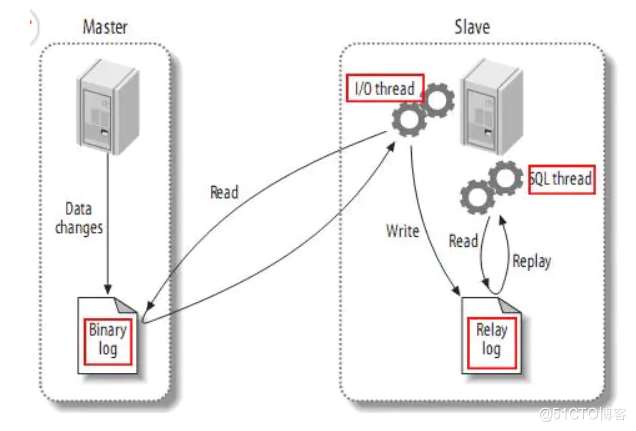
(1) master将改变记录到二进制日志(binary log)中;
(2) slave将master的binary log events拷贝到它的中继日志(relay log);slave的I/O线程从master的二进制日志中读取事件并写入中继日志;
(3) slave重做中继日志中的事件,将改变反映它自己的数据。slave的SQL线程从中继日志读取事件,并在本地重放其中的事件,使其与master中的数据一致。
mysql主从实现的步骤:
1、使用mysqldump 命令备份数据库,
2、查看主节点二进制的位置点
3、创建备份用户,并授权(replication client.replication slave)
4、从服务器修改server-id,必须与主mysql的server-id不同,开启中继日子,关闭二进制日子
5、从数据库,倒入数据,并使用授权用户,连接主mysql
6、start slave
SQL语言共分为以下几大类:查询语言DQL,控制语言DCL,操纵语言DML,定义语言DDL。事务控制TCL.
DQL(Data QUERY Languages)语句:即数据库定义语句,用来查询SELECT子句,FROM子句,WHERE子句组成的查询块,比如:select–from–where–grouop by–having–order by–limit
DDL(Data Definition Languages)语句:即数据库定义语句,用来创建数据库中的表、索引、视图、存储过程、触发器等,常用的语句关键字有CREATE,ALTER,DROP,TRUNCATE,COMMENT,RENAME。增删改表的结构
DML(Data Manipulation Language)语句:即数据操纵语句,用来查询、添加、更新、删除等,常用的语句关键字有:SELECT,INSERT,UPDATE,DELETE,MERGE,CALL,EXPLAIN PLAN,LOCK TABLE,包括通用性的增删改查。增删改表的数据
DCL(Data Control Language)语句:即数据控制语句,用于授权/撤销数据库及其字段的权限(DCL is short name of Data Control Language which includes commands such as GRANT and mostly concerned with rights, permissions and other controls of the database system.)。常用的语句关键字有:GRANT,REVOKE。
TCL(Transaction Control Language)语句:事务控制语句,用于控制事务,常用的语句关键字有:COMMIT,ROLLBACK,SAVEPOINT,SET TRANSACTION。
二、mysql编译安装
#!/bin/bash
yum -y install make gcc gcc-c++ openssl openssl-devel pcre-devel gd cmake ncurses ncurses-devel
id -u mysql
if [ `echo $?` -ne 0 ];
then
groupadd mysql
useradd -M -g mysql -s /sbin/nologin mysql
fi

if [ ! -d  "/usr/local/mysql" ];
then
    mkdir -p /usr/local/mysql
fi
mkdir -p /data/mysql
chown -R mysql:mysql /data/mysql
cd /home/soft/                          #软件存放目录
tar zxvf mysql-5.6.30.tar.gz
cd mysql-5.6.30

cmake -DCMAKE_INSTALL_PREFIX=/usr/local/mysql -DSYSCONFDIR=/etc -DMYSQL_DATADIR=/data/mysql/data -DINSTALL_MANDIR=/usr/share/man -DMYSQL_TCP_PORT=3306 -DMYSQL_UNIX_ADDR=/tmp/mysql.sock -DDEFAULT_CHARSET=utf8 -DEXTRA_CHARSETS=all -DDEFAULT_COLLATION=utf8_general_ci -DWITH_READLINE=1 -DWITH_SSL=system -DWITH_EMBEDDED_SERVER=1 -DENABLED_LOCAL_INFILE=1 -DWITH_INNOBASE_STORAGE_ENGINE=1
make && make install

chown -R mysql:mysql .
chmod +x scripts/mysql_install_db

./scripts/mysql_install_db --user=mysql --basedir=/usr/local/mysql --datadir=/data/mysql
cp ./support-files/mysql.server  /etc/rc.d/init.d/mysqld
chmod 755 /etc/init.d/mysqld
chkconfig mysqld on

cat> /etc/rc.d/init.d/mysqld
# - Add the above to any other configuration file (for example ~/.my.ini)
#   and copy my_print_defaults to /usr/bin
# - Add the path to the mysql-installation-directory to the basedir variable
#   below.
#
# If you want to affect other MySQL variables, you should make your changes
# in the /etc/my.cnf, ~/.my.cnf or other MySQL configuration files.

# If you change base dir, you must also change datadir. These may get
# overwritten by settings in the MySQL configuration files.
basedir=/usr/local/mysql
datadir=/data/mysql

# Default value, in seconds, afterwhich the script should timeout waiting
# for server start.
# Value here is overriden by value in my.cnf.
# 0 means don't wait at all
# Negative numbers mean to wait indefinitely
service_startup_timeout=900

# Lock directory for RedHat / SuSE.
lockdir='/var/lock/subsys'
lock_file_path="$lockdir/mysql"

# The following variables are only set for letting mysql.server find things.

# Set some defaults
mysqld_pid_file_path=
if test -z "$basedir"
then
  basedir=/usr/local/mysql
  bindir=/usr/local/mysql/bin
  if test -z "$datadir"
  then
    datadir=/data/mysql/data
  fi
  sbindir=/usr/local/mysql/bin
  libexecdir=/usr/local/mysql/bin
else
 bindir="$basedir/bin"
  if test -z "$datadir"
  then
    datadir="$basedir/data"
  fi
  sbindir="$basedir/sbin"
  libexecdir="$basedir/libexec"
fi

# datadir_set is used to determine if datadir was set (and so should be
# *not* set inside of the --basedir= handler.)
datadir_set=
# Use LSB init script functions for printing messages, if possible
#
lsb_functions="/lib/lsb/init-functions"
if test -f $lsb_functions ; then
  . $lsb_functions
else
  log_success_msg()
  {
    echo " SUCCESS! $@"
  }
  log_failure_msg()
  {
    echo " ERROR! $@"
  }
fi

PATH="/sbin:/usr/sbin:/bin:/usr/bin:$basedir/bin"
export PATH
mode=$1    # start or stop

[ $# -ge 1 ] && shift


other_args="$*"   # uncommon, but needed when called from an RPM upgrade action
           # Expected: "--skip-networking --skip-grant-tables"
           # They are not checked here, intentionally, as it is the resposibility
           # of the "spec" file author to give correct arguments only.

case `echo "testing\c"`,`echo -n testing` in
    *c*,-n*) echo_n=   echo_c=     ;;
    *c*,*)   echo_n=-n echo_c=     ;;
    *)       echo_n=   echo_c='\c' ;;
esac

parse_server_arguments() {
  for arg do
    case "$arg" in
      --basedir=*)  basedir=`echo "$arg" | sed -e 's/^[^=]*=//'`
                    bindir="$basedir/bin"
                    if test -z "$datadir_set"; then
                      datadir="$basedir/data"
                    fi
                    sbindir="$basedir/sbin"
                    libexecdir="$basedir/libexec"
        ;;
      --datadir=*)  datadir=`echo "$arg" | sed -e 's/^[^=]*=//'`
                    datadir_set=1
        ;;
      --pid-file=*) mysqld_pid_file_path=`echo "$arg" | sed -e 's/^[^=]*=//'` ;;
      --service-startup-timeout=*) service_startup_timeout=`echo "$arg" | sed -e 's/^[^=]*=//'` ;;
    esac
  done
}

wait_for_pid () {
  verb="$1"           # created | removed
  pid="$2"            # process ID of the program operating on the pid-file
pid_file_path="$3" # path to the PID file.

  i=0
  avoid_race_condition="by checking again"

  while test $i -ne $service_startup_timeout ; do

    case "$verb" in
      'created')
        # wait for a PID-file to pop into existence.
        test -s "$pid_file_path" && i='' && break
        ;;
      'removed')
        # wait for this PID-file to disappear
        test ! -s "$pid_file_path" && i='' && break
        ;;
      *)
        echo "wait_for_pid () usage: wait_for_pid created|removed pid pid_file_path"
        exit 1
        ;;
    esac

    # if server isn't running, then pid-file will never be updated
    if test -n "$pid"; then
 if kill -0 "$pid" 2>/dev/null; then
        :  # the server still runs
      else
        # The server may have exited between the last pid-file check and now.
        if test -n "$avoid_race_condition"; then
          avoid_race_condition=""
          continue  # Check again.

        fi

        # there's nothing that will affect the file.
        log_failure_msg "The server quit without updating PID file ($pid_file_path)."
        return 1  # not waiting any more.
      fi
    fi

    echo $echo_n ".$echo_c"
    i=`expr $i + 1`
    sleep 1

  done

  if test -z "$i" ; then
    log_success_msg
    return 0
  else
    log_failure_msg
    return 1
  fi
}

# Get arguments from the my.cnf file,
# the only group, which is read from now on is [mysqld]
if test -x ./bin/my_print_defaults
then
  print_defaults="./bin/my_print_defaults"
elif test -x $bindir/my_print_defaults
then
  print_defaults="$bindir/my_print_defaults"
elif test -x $bindir/mysql_print_defaults
then
  print_defaults="$bindir/mysql_print_defaults"
else
  # Try to find basedir in /etc/my.cnf
  conf=/etc/my.cnf
  print_defaults=
  if test -r $conf
  then
    subpat='^[^=]*basedir[^=]*=\(.*\)$'
    dirs=`sed -e "/$subpat/!d" -e 's//\1/' $conf`
    for d in $dirs
    do
      d=`echo $d | sed -e 's/[  ]//g'`
      if test -x "$d/bin/my_print_defaults"
      then
        print_defaults="$d/bin/my_print_defaults"
        break
      fi
      if test -x "$d/bin/mysql_print_defaults"
      then
      print_defaults="$d/bin/mysql_print_defaults"
        break
      fi
    done
  fi
  # Hope it's in the PATH ... but I doubt it
  test -z "$print_defaults" && print_defaults="my_print_defaults"
fi

#
# Read defaults file from 'basedir'.   If there is no defaults file there
# check if it's in the old (depricated) place (datadir) and read it from there
#

extra_args=""
if test -r "$basedir/my.cnf"
then
  extra_args="-e $basedir/my.cnf"
else
  if test -r "$datadir/my.cnf"
  then
    extra_args="-e $datadir/my.cnf"
  fi
fi

parse_server_arguments `$print_defaults $extra_args mysqld server mysql_server mysql.server`

#
# Set pid file if not given
#
if test -z "$mysqld_pid_file_path"
then
  mysqld_pid_file_path=$datadir/`hostname`.pid
else
  case "$mysqld_pid_file_path" in
    /* ) ;;
    * )  mysqld_pid_file_path="$datadir/$mysqld_pid_file_path" ;;
  esac
fi

case "$mode" in
  'start')
    # Start daemon

    # Safeguard (relative paths, core dumps..)
    cd $basedir

    echo $echo_n "Starting MySQL"
    if test -x $bindir/mysqld_safe
    then
      # Give extra arguments to mysqld with the my.cnf file. This script
      # may be overwritten at next upgrade.
      $bindir/mysqld_safe --datadir="$datadir" --pid-file="$mysqld_pid_file_path" $other_args >/dev/null 2>&1 &
      wait_for_pid created "$!" "$mysqld_pid_file_path"; return_value=$?

      # Make lock for RedHat / SuSE
      if test -w "$lockdir"
      then
        touch "$lock_file_path"
      fi
  exit $return_value
    else
      log_failure_msg "Couldn't find MySQL server ($bindir/mysqld_safe)"
    fi
    ;;

  'stop')
    # Stop daemon. We use a signal here to avoid having to know the
    # root password.

    if test -s "$mysqld_pid_file_path"
    then
      mysqld_pid=`cat "$mysqld_pid_file_path"`

      if (kill -0 $mysqld_pid 2>/dev/null)
      then
        echo $echo_n "Shutting down MySQL"
        kill $mysqld_pid
        # mysqld should remove the pid file when it exits, so wait for it.
        wait_for_pid removed "$mysqld_pid" "$mysqld_pid_file_path"; return_value=$?
      else
        log_failure_msg "MySQL server process #$mysqld_pid is not running!"
        rm "$mysqld_pid_file_path"
      fi

      # Delete lock for RedHat / SuSE
      if test -f "$lock_file_path"
      then
        rm -f "$lock_file_path"
      fi
      exit $return_value
 else
      log_failure_msg "MySQL server PID file could not be found!"
    fi
    ;;

  'restart')
    # Stop the service and regardless of whether it was
    # running or not, start it again.
    if $0 stop  $other_args; then
      $0 start $other_args
    else
      log_failure_msg "Failed to stop running server, so refusing to try to start."
      exit 1
    fi
    ;;

  'reload'|'force-reload')
    if test -s "$mysqld_pid_file_path" ; then
      read mysqld_pid /dev/null ; then
  log_success_msg "MySQL running ($mysqld_pid)"
        exit 0
      else
        log_failure_msg "MySQL is not running, but PID file exists"
        exit 1
      fi
    else
      # Try to find appropriate mysqld process
      mysqld_pid=`pidof $libexecdir/mysqld`
      if test -z $mysqld_pid ; then
        if test -f "$lock_file_path" ; then
          log_failure_msg "MySQL is not running, but lock file ($lock_file_path) exists"
          exit 2
        fi
        log_failure_msg "MySQL is not running"
        exit 3
      else
        log_failure_msg "MySQL is running but PID file could not be found"
        exit 4
      fi
    fi
    ;;
    *)
      # usage
      basename=`basename "$0"`
      echo "Usage: $basename  {start|stop|restart|reload|force-reload|status}  [ MySQL server options ]"
      exit 1
    ;;

esac

exit 0
EOF

cat> /etc/my.cnf > /etc/profile
sleep 2
source /etc/profile

service mysqld start

sleep 5
cd /usr/local/mysql/bin && mysqladmin -uroot password 'mysql'    #授权root用户的password
source /etc/profile
三、主从配置
1、这里验证主库有数据的情况,然后授权有复制权限的用户
mysql> create database db1;
mysql> use db1
mysql> create table t1(id int, name varchar(12));
mysql> insert into t1 values(1, 'tom'), (2, 'jerry'), (3, 'jack');
mysql> grant replication slave,replication client  on *.* to 'backuser'@'192.168.142.130' identified by 'mysqll';
mysql> grant replication slave,replication client  on *.* to 'backuser'@'192.168.142.131' identified by 'mysql';
mysql> flush privileges;
2、修改各个数据库的配置文件后重启数据库
vi /etc/my.cnf        #主库配置文件
server-id=1
log-bin=mysql-bin
binlog-do-db=db1
binlog-ignore-db=mysql

vi /etc/my.cnf       #从库配置文件
server-id=2           #从库id不能和主库一样,其他从库往后面排
log-bin=relay-bin
replicate-do-db=db1        #同步db1库
replicate-ignore-db=mysql  #不会同步mysql库
read_only                  #只读

service mysqld restart
3、主库锁表备份,然后文件传给从库
mysql> flush tables with read lock;     #主库锁表防止新的数据写入
mysql> show master status;              #查看主库位置节点

新打开一个终端备份:
mysqldump -u root -p --default-character-set=utf8 --opt -Q -R --skip-lock-tables db1 > /root/db1.sql
scp /root/db1.sql root@192.168.142.130:/root
scp /root/db1.sql root@192.168.142.130:/root
4、从库导入数据,然后change到主库的节点
mysql -u root -p
mysql> create database db1;
mysql> use db1
mysql> source /root/db1.sql
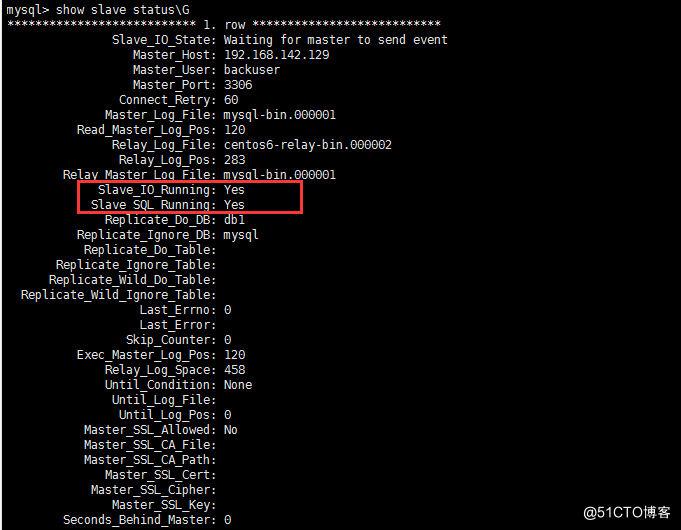
mysql> change master to master_host='192.168.142.129',master_user='backuser',master_password='mysql',master_log_file='mysql-bin.000001',master_log_pos=120;
mysql> start slave;
mysql> show slave status\G
5、主库解锁
mysql> unlock tables;
以上配置对主从不同步,重新配置主从同样适用。
四、主从不同步
1、造成不同步的原因
网络的延迟主从两台机器的负载不一致max_allowed_packet设置不一致key自增键开始的键值跟自增步长设置不一致引起的主从不一致mysql异常宕机情况下,如果未设置sync_binlog=1或者innodb_flush_log_at_trx_commit=1很有可能
出现binlog或者relaylog文件出现损坏,导致主从不一致mysql本身的bug引起的主从不同步版本不一致,特别是高版本是主,低版本为从的情况下,主数据库上面支持的功能,从数据库上面不支持该功能
2、解决办法
(1)忽略错误后,继续同步
该方法适用于主从库数据相差不大,或者要求数据可以不完全统一的情况,数据要求不严格的情况
stop slave;
set global sql_slave_skip_counter =1;
start slave;
show slave status\G
(2)重新做主从
参考上面配置主库锁表重新做主从。
今天关于《mysql5.6主从搭建以及不同步问题详解》的内容介绍就到此结束,如果有什么疑问或者建议,可以在golang学习网公众号下多多回复交流;文中若有不正之处,也希望回复留言以告知!
 防止web项目中的SQL注入
- 上一篇
- 防止web项目中的SQL注入
- 下一篇
- MySQL图形化管理工具Navicat安装步骤
-

- 受伤的秋天
- 这篇技术贴真及时,太全面了,真优秀,已加入收藏夹了,关注作者大大了!希望作者大大能多写数据库相关的文章。
- 2023-02-16 21:01:27
-
- 温婉的红酒
- 很好,一直没懂这个问题,但其实工作中常常有遇到...不过今天到这,看完之后很有帮助,总算是懂了,感谢师傅分享文章!
- 2023-02-08 17:10:44
-
- 单身的手套
- 太全面了,已收藏,感谢老哥的这篇博文,我会继续支持!
- 2023-01-17 05:16:01
-
- 单纯的过客
- 这篇文章内容真是及时雨啊,太详细了,写的不错,已收藏,关注作者大大了!希望作者大大能多写数据库相关的文章。
- 2023-01-03 09:41:07
-
- 数据库 · MySQL | 1小时前 |
- MySQL utf8mb4 排序规则变化会影响唯一索引吗
- 431浏览 收藏
-
- 数据库 · MySQL | 2小时前 |
- MySQL 联合索引中间列范围条件为什么影响后列
- 454浏览 收藏
-
- 数据库 · MySQL | 3小时前 |
- MySQL EXPLAIN ANALYZE 如何观察临时表和排序开销
- 196浏览 收藏
-

- 数据库 · MySQL | 6小时前 |
- MySQL 分区表查询没走分区裁剪怎么办
- 134浏览 收藏
-

- 数据库 · MySQL | 7小时前 |
- MySQL 死锁日志看不懂时先找哪两条事务
- 467浏览 收藏
-

- 数据库 · MySQL | 8小时前 |
- MySQL JSON 数组字段如何建立可用索引
- 482浏览 收藏
-

- 数据库 · MySQL | 13小时前 | MySQL · rank · 窗口函数 · ROW_NUMBER · DENSE_RANK ·
- MySQL 窗口函数如何取每组排名第二的记录
- 478浏览 收藏
-

- 数据库 · MySQL | 1天前 |
- MySQL 在线 ALTER TABLE 前怎么判断是否会重建表
- 339浏览 收藏


-

- 前端进阶之JavaScript设计模式
- 设计模式是开发人员在软件开发过程中面临一般问题时的解决方案,代表了最佳的实践。本课程的主打内容包括JS常见设计模式以及具体应用场景,打造一站式知识长龙服务,适合有JS基础的同学学习。
- 543次学习
-

- GO语言核心编程课程
- 本课程采用真实案例,全面具体可落地,从理论到实践,一步一步将GO核心编程技术、编程思想、底层实现融会贯通,使学习者贴近时代脉搏,做IT互联网时代的弄潮儿。
- 516次学习
-

- 简单聊聊mysql8与网络通信
- 如有问题加微信:Le-studyg;在课程中,我们将首先介绍MySQL8的新特性,包括性能优化、安全增强、新数据类型等,帮助学生快速熟悉MySQL8的最新功能。接着,我们将深入解析MySQL的网络通信机制,包括协议、连接管理、数据传输等,让
- 500次学习
-

- JavaScript正则表达式基础与实战
- 在任何一门编程语言中,正则表达式,都是一项重要的知识,它提供了高效的字符串匹配与捕获机制,可以极大的简化程序设计。
- 487次学习
-

- 从零制作响应式网站—Grid布局
- 本系列教程将展示从零制作一个假想的网络科技公司官网,分为导航,轮播,关于我们,成功案例,服务流程,团队介绍,数据部分,公司动态,底部信息等内容区块。网站整体采用CSSGrid布局,支持响应式,有流畅过渡和展现动画。
- 485次学习
-

- H2O EvalGPT
- H2O EvalGPT是H2O.ai推出的开源LLM评估平台,提供详细的大模型性能排行榜、行业特定基准测试及A/B测试功能,助您快速选择最适合项目的高性能大语言模型。
- 108次使用
-

- LMArena
- LMArena是加州大学伯克利分校推出的AI模型匿名评测平台。通过盲测投票机制,用户可对比不同大模型回答并生成实时排行榜,助力开发者优化模型及用户选择最佳AI工具。
- 23次使用
-

- OpenCompass
- OpenCompass是上海AI实验室推出的开源大模型评测平台,提供CompassKit、CompassHub和CompassRank三大核心组件,支持LLM及多模态模型的一站式标准化评估与排行榜查询。
- 37次使用
-

- AGI-Eval
- AGI-Eval是由上海交大等高校联合发布的大模型评测社区,提供公正透明的LLM能力榜单、多领域评测集及Data Studio数据服务,助力AI模型性能评估与NLP科研开发。
- 23次使用
-
- SuperCLUE
- SuperCLUE是权威的中文大语言模型综合评测基准,涵盖语言理解、知识应用、AI Agent智能体及安全性等12项核心能力。通过多轮对话与客观测试,定期发布榜单与技术报告,为模型研发、优化及行业选型提供科学依据。
- 263次使用
-
- 可能是最贴心的MySQL笔记了
- 2023-02-24 368浏览
-
- 一文详解MySQL主从同步原理
- 2022-12-30 371浏览
-
- MySQL的主从复制原理详细分析
- 2022-12-29 151浏览
-
- MySQL主从复制问题总结及排查过程
- 2022-12-28 437浏览
-
- MySQL 搭建主从同步实现操作
- 2023-01-07 117浏览


