
shadcn-ui/ui 代码库分析:shadcn-ui CLI 是如何工作的? - 第1部分
哈喽!今天心血来潮给大家带来了《shadcn-ui/ui 代码库分析:shadcn-ui CLI 是如何工作的? - 第1部分》,想必大家应该对文章都不陌生吧,那么阅读本文就都不会很困难,以下内容主要涉及到,若是你正在学习文章,千万别错过这篇文章~希望能帮助到你!
我想了解 shadcn-ui cli 是如何工作的。在本文中,我讨论用于构建 shadcn-ui/ui cli 的代码。
在第2.10部分中,我们查看了getregistrybasecolors函数、提示、创建components.json和resolveconfigpaths。
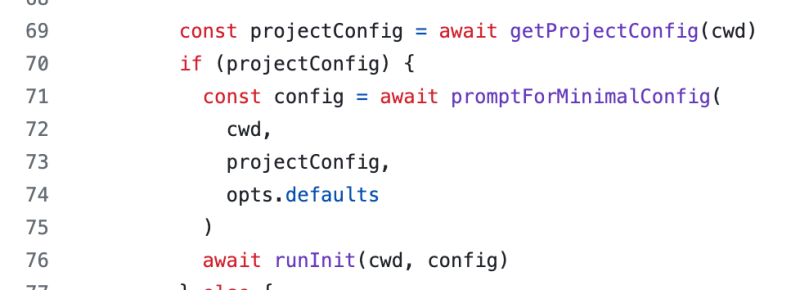
现在我们了解了promptforminimalconfig函数是如何工作的,是时候我们来了解runinit函数是如何工作的了。
运行初始化
export async function runinit(cwd: string, config: config) {
  const spinner = ora(\`initializing project...\`)?.start()

  // ensure all resolved paths directories exist.
  for (const \[key, resolvedpath\] of object.entries(config.resolvedpaths)) {
    // determine if the path is a file or directory.
    // todo: is there a better way to do this?
    let dirname = path.extname(resolvedpath)
      ? path.dirname(resolvedpath)
      : resolvedpath

    // if the utils alias is set to something like "@/lib/utils",
    // assume this is a file and remove the "utils" file name.
    // todo: in future releases we should add support for individual utils.
    if (key === "utils" && resolvedpath.endswith("/utils")) {
      // remove /utils at the end.
      dirname = dirname.replace(/\\/utils$/, "")
    }

    if (!existssync(dirname)) {
      await fs.mkdir(dirname, { recursive: true })
    }
  }

  const extension = config.tsx ? "ts" : "js"

  const tailwindconfigextension = path.extname(
    config.resolvedpaths.tailwindconfig
  )

  let tailwindconfigtemplate: string
  if (tailwindconfigextension === ".ts") {
    tailwindconfigtemplate = config.tailwind.cssvariables
      ? templates.tailwind\_config\_ts\_with\_variables
      : templates.tailwind\_config\_ts
  } else {
    tailwindconfigtemplate = config.tailwind.cssvariables
      ? templates.tailwind\_config\_with\_variables
      : templates.tailwind\_config
  }

  // write tailwind config.
  await fs.writefile(
    config.resolvedpaths.tailwindconfig,
    template(tailwindconfigtemplate)({
      extension,
      prefix: config.tailwind.prefix,
    }),
    "utf8"
  )

  // write css file.
  const basecolor = await getregistrybasecolor(config.tailwind.basecolor)
  if (basecolor) {
    await fs.writefile(
      config.resolvedpaths.tailwindcss,
      config.tailwind.cssvariables
        ? config.tailwind.prefix
          ? applyprefixescss(basecolor.cssvarstemplate, config.tailwind.prefix)
          : basecolor.cssvarstemplate
        : basecolor.inlinecolorstemplate,
      "utf8"
    )
  }

  // write cn file.
  await fs.writefile(
    \`${config.resolvedpaths.utils}.${extension}\`,
    extension === "ts" ? templates.utils : templates.utils\_js,
    "utf8"
  )

  spinner?.succeed()

  // install dependencies.
  const dependenciesspinner = ora(\`installing dependencies...\`)?.start()
  const packagemanager = await getpackagemanager(cwd)

  // todo: add support for other icon libraries.
  const deps = \[
    ...project\_dependencies,
    config.style === "new-york" ? "@radix-ui/react-icons" : "lucide-react",
  \]

  await execa(
    packagemanager,
    \[packagemanager === "npm" ? "install" : "add", ...deps\],
    {
      cwd,
    }
  )
  dependenciesspinner?.succeed()
}
这个函数相当大,让我们通过研究小代码块来分解这个分析。
嗯,这段代码已经添加了一些特定于操作的注释。我们可以遵循相同的评论将此分析分解为多个部分。
- 确保所有已解析的路径目录都存在。
- 编写 tailwind 配置。
- 编写css文件。
- 写入 cn 文件。
- 安装依赖项。
在本文中,我们来看看 shadcn-ui/ui cli 如何确保所有已解析的路径目录都存在。
确保所有已解析的路径目录都存在。
// ensure all resolved paths directories exist.
  for (const \[key, resolvedpath\] of object.entries(config.resolvedpaths)) {
    // determine if the path is a file or directory.
    // todo: is there a better way to do this?
    let dirname = path.extname(resolvedpath)
      ? path.dirname(resolvedpath)
      : resolvedpath

    // if the utils alias is set to something like "@/lib/utils",
    // assume this is a file and remove the "utils" file name.
    // todo: in future releases we should add support for individual utils.
    if (key === "utils" && resolvedpath.endswith("/utils")) {
      // remove /utils at the end.
      dirname = dirname.replace(/\\/utils$/, "")
    }

    if (!existssync(dirname)) {
      await fs.mkdir(dirname, { recursive: true })
    }
  }
在2.10文章中,我谈到了config如何添加resolvedpaths对象。
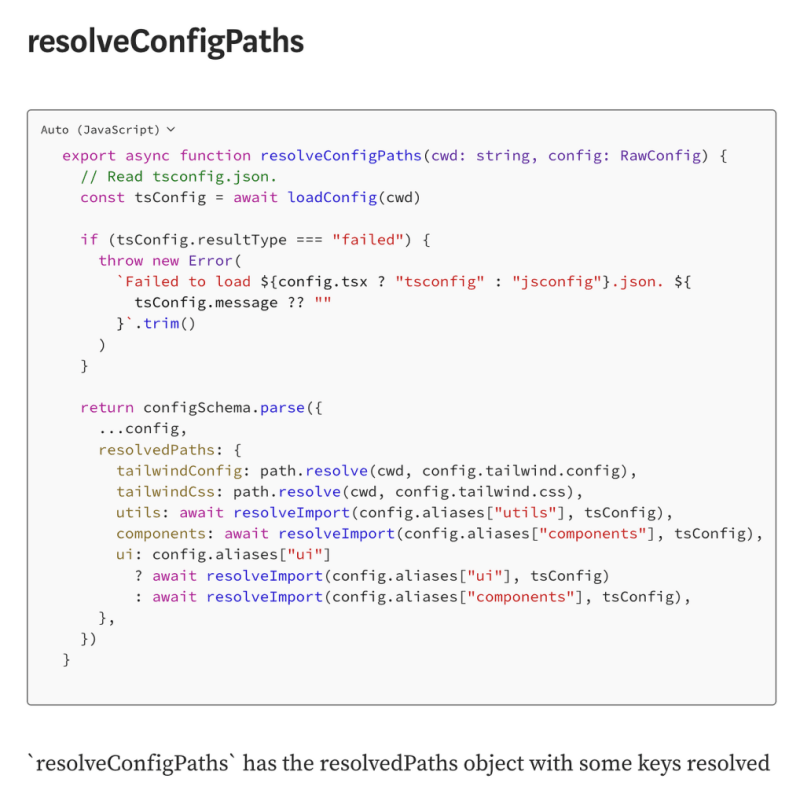
// determine if the path is a file or directory.
// todo: is there a better way to do this?
let dirname = path.extname(resolvedpath)
  ? path.dirname(resolvedpath)
  : resolvedpath
上面的代码使用了path。 path.extname() 方法返回路径的扩展名,从最后一次出现的 . (句点)字符到路径最后部分中字符串的末尾。如果没有 .在路径的最后部分,或者如果没有 .路径基本名称的第一个字符以外的字符(请参阅path.basename()),返回空字符串。
// if the utils alias is set to something like "@/lib/utils",
// assume this is a file and remove the "utils" file name.
// todo: in future releases we should add support for individual utils.
if (key === "utils" && resolvedpath.endswith("/utils")) {
  // remove /utils at the end.
  dirname = dirname.replace(/\\/utils$/, "")
}
上面代码中的注释已经说明了一切。
if (!existsSync(dirname)) {
  await fs.mkdir(dirname, { recursive: true })
}
existssync 是“fs”包中的函数,如果路径存在则返回 true,否则返回 false。
如果目录不存在,则使用fs.mkdir创建目录。
结论:
现在我了解了promptforminimalconfig函数的工作原理,是时候继续了解runinit函数在shadcn-ui/ui cli相关源代码中的工作原理了。
runinit 函数相当大,让我们通过研究小代码块来分解这个分析。这已经有一些注释解释了它的作用。这些带注释的操作如下:
- 确保所有已解析的路径目录都存在。
- 编写 tailwind 配置。
- 编写css文件。
- 写入 cn 文件。
- 安装依赖项。
我讨论了shadcn的init命令如何通过使用“fs”包中的existssync来确保所有已解析的路径目录都存在,如果目录不存在,该函数只需使用mkdir创建一个新目录。
想学习如何从头开始构建 shadcn-ui/ui 吗?查看 从头开始构建
关于我:
网站:https://ramunarasinga.com/
linkedin:https://www.linkedin.com/in/ramu-narasinga-189361128/
github:https://github.com/ramu-narasinga
电子邮件:ramu.narasinga@gmail.com
从头开始构建 shadcn-ui/ui
参考:
- https://github.com/shadcn-ui/ui/blob/main/packages/cli/src/commands/init.ts#l81
- https://github.com/shadcn-ui/ui/blob/main/packages/cli/src/commands/init.ts#l307
终于介绍完啦!小伙伴们,这篇关于《shadcn-ui/ui 代码库分析:shadcn-ui CLI 是如何工作的? - 第1部分》的介绍应该让你收获多多了吧!欢迎大家收藏或分享给更多需要学习的朋友吧~golang学习网公众号也会发布文章相关知识,快来关注吧!
 Golang框架如何与PHP集成?
- 上一篇
- Golang框架如何与PHP集成?
- 下一篇
- 用户代理检测和 ua-parser-js 许可证更改
-
- 文章 · 前端 | 1小时前 | 前端 · css ·
- CSS 层叠层解决组件库与业务样式优先级冲突
- 464浏览 收藏
-
- 文章 · 前端 | 3小时前 |
- 浏览器缓存命中却仍请求服务器:强缓存与协商缓存排查
- 477浏览 收藏
-
- 文章 · 前端 | 6小时前 | javascript · 懒加载 IntersectionObserver 前端队列
- 用 IntersectionObserver 构建可停止的懒加载队列
- 401浏览 收藏
-
- 文章 · 前端 | 1天前 |
- 前端状态更新频繁时,批处理与去抖分别解决什么
- 227浏览 收藏
-
- 文章 · 前端 | 1天前 | 前端 · 可访问性 · 焦点陷阱 HTML dialog 焦点恢复 inert 无障碍弹窗
- 可访问弹窗的焦点陷阱、关闭恢复与背景隔离
- 309浏览 收藏
-
- 文章 · 前端 | 1天前 | 前端 · 性能优化 · javascript · ArrayBuffer postMessage 前端性能 Web Worker Transferable structured clone
- Web Worker 传大数据为何卡顿:复制与 Transferable 对比
- 220浏览 收藏
-
- 文章 · 前端 | 1天前 | 请求超时 Fetch AbortController AbortSignal 用户取消 前端异常处理
- Fetch 请求取消后,超时与用户中断要怎样区分
- 466浏览 收藏
-
- 文章 · 前端 | 1天前 | 文件上传 · javascript · 前端开发 · 大文件上传 断点续传 XMLHttpRequest Blob.slice 前端分片上传 暂停上传
- 前端上传大文件:分片、暂停与失败续传怎样协作
- 371浏览 收藏
-
- 文章 · 前端 | 1天前 | 列表详情 View Transition API 前端渐进增强
- View Transition API 做列表到详情过渡的渐进增强
- 385浏览 收藏
-
- 文章 · 前端 | 1天前 |
- 用 CSS Container Query 让卡片按容器而不是视口响应
- 289浏览 收藏
-
- 文章 · 前端 | 1天前 | 环境变量 vite loadEnv vite.config
- Vite 环境变量为什么在配置加载时取不到
- 133浏览 收藏
-
- 文章 · 前端 | 1天前 |
- React useOptimistic 怎么在请求失败时回滚列表
- 153浏览 收藏
-

- 前端进阶之JavaScript设计模式
- 设计模式是开发人员在软件开发过程中面临一般问题时的解决方案,代表了最佳的实践。本课程的主打内容包括JS常见设计模式以及具体应用场景,打造一站式知识长龙服务,适合有JS基础的同学学习。
- 543次学习
-

- GO语言核心编程课程
- 本课程采用真实案例,全面具体可落地,从理论到实践,一步一步将GO核心编程技术、编程思想、底层实现融会贯通,使学习者贴近时代脉搏,做IT互联网时代的弄潮儿。
- 516次学习
-

- 简单聊聊mysql8与网络通信
- 如有问题加微信:Le-studyg;在课程中,我们将首先介绍MySQL8的新特性,包括性能优化、安全增强、新数据类型等,帮助学生快速熟悉MySQL8的最新功能。接着,我们将深入解析MySQL的网络通信机制,包括协议、连接管理、数据传输等,让
- 500次学习
-

- JavaScript正则表达式基础与实战
- 在任何一门编程语言中,正则表达式,都是一项重要的知识,它提供了高效的字符串匹配与捕获机制,可以极大的简化程序设计。
- 487次学习
-

- 从零制作响应式网站—Grid布局
- 本系列教程将展示从零制作一个假想的网络科技公司官网,分为导航,轮播,关于我们,成功案例,服务流程,团队介绍,数据部分,公司动态,底部信息等内容区块。网站整体采用CSSGrid布局,支持响应式,有流畅过渡和展现动画。
- 485次学习
-

- PubMedQA
- 深入了解PubMedQA生物医学问答数据集,涵盖其核心功能、使用方法及在临床决策、药物研发等场景的应用,助力提升NLP模型性能。
- 378次使用
-

- H2O EvalGPT
- H2O EvalGPT是H2O.ai推出的开源LLM评估平台,提供详细的大模型性能排行榜、行业特定基准测试及A/B测试功能,助您快速选择最适合项目的高性能大语言模型。
- 449次使用
-

- LMArena
- LMArena是加州大学伯克利分校推出的AI模型匿名评测平台。通过盲测投票机制,用户可对比不同大模型回答并生成实时排行榜,助力开发者优化模型及用户选择最佳AI工具。
- 457次使用
-

- HELM
- 深入了解斯坦福推出的HELM(Holistic Evaluation of Language Models)大模型评测体系。本文解析其核心功能、安装配置步骤及应用场景,涵盖准确性、公平性、鲁棒性等多维度指标,助力开发者全面优化语言模型性能。
- 400次使用
-

- MMBench
- MMBench是由上海人工智能实验室等机构联合推出的多模态基准测试平台,提供细粒度能力评估、大规模数据集及VLMEvalKit工具。本文详细介绍其核心功能、安装使用方法及应用场景,助力开发者全面评估多模态模型性能。
- 227次使用
-
- JavaScript函数定义及示例详解
- 2025-05-11 502浏览
-
- 智能体安全引领产业升级——国内AI安全产品市场深度分析
- 2026-08-21 501浏览
-
- CSS变量简化按钮悬停效果技巧
- 2026-05-31 501浏览
-
- JavaScript符号类型详解与应用
- 2026-05-31 501浏览
-
- HTML剪贴板复制粘贴怎么用
- 2026-05-26 501浏览


